<?xml version="1.0" encoding="utf-8"?><feed xmlns="http://www.w3.org/2005/Atom" ><generator uri="https://jekyllrb.com/" version="3.10.0">Jekyll</generator><link href="https://www.theroadtocloud.com/feed.xml" rel="self" type="application/atom+xml" /><link href="https://www.theroadtocloud.com/" rel="alternate" type="text/html" /><updated>2026-02-11T17:06:40+00:00</updated><id>https://www.theroadtocloud.com/feed.xml</id><title type="html">Road to Cloud</title><subtitle>Chronicles on the road to cloud.</subtitle><author><name>Almir Banjanovic</name></author><entry><title type="html">KAITO on AKS: Why Would You Use It Instead of Microsoft Foundry?</title><link href="https://www.theroadtocloud.com/blog/kaito-on-aks/" rel="alternate" type="text/html" title="KAITO on AKS: Why Would You Use It Instead of Microsoft Foundry?" /><published>2026-02-09T00:00:00+00:00</published><updated>2026-02-09T00:00:00+00:00</updated><id>https://www.theroadtocloud.com/blog/kaito-on-aks</id><content type="html" xml:base="https://www.theroadtocloud.com/blog/kaito-on-aks/"><![CDATA[<h1 id="kaito-on-aks">KAITO on AKS</h1>

<p>I recently added a new playground to <a href="https://github.com/almirbanjanovic/cloud-playground-infra">cloud-playground-infra</a>: a fully automated <a href="https://github.com/almirbanjanovic/cloud-playground-infra/tree/main/environments/kaito-on-aks">KAITO-on-AKS</a> environment.</p>

<p>By the way, you should also check out <a href="https://www.theroadtocloud.com/blog/cloud-playground-infra/">my other blog post on what cloud-playground-infra</a> helps us do.</p>

<hr />

<h2 id="what-is-kaito">What is KAITO?</h2>

<p><a href="https://github.com/kaito-project/kaito">KAITO (Kubernetes AI Toolchain Operator)</a> is an operator that automates AI/ML model inference and tuning workloads in Kubernetes. Microsoft has enabled <a href="https://learn.microsoft.com/en-us/azure/aks/ai-toolchain-operator">KAITO on AKS</a>. KAITO simplifies running AI/ML inference by:</p>

<ul>
  <li><strong>Automatic node provisioning</strong> - Spins up GPU/CPU nodes based on model requirements</li>
  <li><strong>Model lifecycle management</strong> - Downloads weights, manages inference server lifecycle</li>
  <li><strong>Preset models</strong> - Built-in support for popular models (Llama, Mistral, Falcon, Phi, etc.)</li>
  <li><strong>Custom models</strong> - Deploy your own models from HuggingFace, Azure Blob Storage, Azure Files, or Azure ML Model Registry</li>
  <li><strong>OpenAI-compatible API</strong> - Provides a standard interface for inference calls</li>
</ul>

<hr />

<h2 id="kaito-on-aks-vs-microsoft-foundry">KAITO on AKS vs. Microsoft Foundry</h2>

<p>You might wonder: why use <a href="https://learn.microsoft.com/en-us/azure/aks/ai-toolchain-operator">KAITO on AKS</a>, when <a href="https://learn.microsoft.com/en-us/azure/ai-foundry/what-is-foundry?view=foundry-classic">Microsoft Foundry</a> offers thousands of models for inference? Well both approaches solve different problems. Some teams benefit from having both available, while others should choose carefully depending on which industry they serve. Microsoft Foundry is an excellent PaaS product. It gives customers a fully managed, secure, and production-ready platform for running LLMs without touching GPU infrastructure. So, how do we go about understanding <em>when</em> a Kubernetes-native approach like KAITO on AKS makes sense?</p>

<h3 id="side-by-side-overview">Side-by-Side Overview</h3>

<table>
  <thead>
    <tr>
      <th>Consideration</th>
      <th>KAITO on AKS</th>
      <th>Microsoft Foundry</th>
    </tr>
  </thead>
  <tbody>
    <tr>
      <td><strong>Service model</strong></td>
      <td>PaaS - you manage cluster and model deployments</td>
      <td>PaaS - you consume models via APIs</td>
    </tr>
    <tr>
      <td><strong>Model selection</strong></td>
      <td>Full control - any model from HuggingFace, Azure Blob/Files, Azure ML Registry, or private registries</td>
      <td>Curated catalog with regional availability limitations (not all models available in all regions)</td>
    </tr>
    <tr>
      <td><strong>Compliance</strong></td>
      <td>Easier to meet strict regulatory requirements (HIPAA, FedRAMP, etc.)</td>
      <td>Depends on service compliance certifications</td>
    </tr>
    <tr>
      <td><strong>Data sovereignty</strong></td>
      <td>Models run in your cluster, data never leaves your network</td>
      <td>Data sent to Microsoft-managed endpoints</td>
    </tr>
    <tr>
      <td><strong>Cost model</strong></td>
      <td>Pay for VM compute only, no per-token charges</td>
      <td>Pay-per-token or provisioned throughput</td>
    </tr>
    <tr>
      <td><strong>Customization</strong></td>
      <td>Full control over inference parameters, batching, quantization</td>
      <td>Limited to provider-exposed options</td>
    </tr>
    <tr>
      <td><strong>Latency</strong></td>
      <td>In-cluster inference, minimal network hops</td>
      <td>Network round-trip to external endpoint</td>
    </tr>
  </tbody>
</table>

<h3 id="when-kaito-on-aks-makes-sense">When KAITO on AKS Makes Sense</h3>
<p>Use KAITO on AKS when you need data to remain in your environment, want consistent compute-based costs, have strict compliance requirements, or need deep customization of how models run.</p>

<h3 id="when-microsoft-foundry-makes-sense">When Microsoft Foundry Makes Sense</h3>
<p>Use Foundry when you want a fully managed experience, access to proprietary models like GPT‑4 or Claude, consumption-based pricing, and no GPU or cluster management.</p>

<hr />
<h2 id="architecture">Architecture</h2>

<p><img src="https://raw.githubusercontent.com/kaito-project/kaito/main/website/static/img/arch.png" alt="KAITO Architecture" /></p>

<p>KAITO follows the classic Kubernetes CRD/controller pattern. Its major components are:</p>

<ul>
  <li><strong>Workspace controller</strong> - Reconciles the Workspace custom resource, triggers node provisioning via NodeClaim CRDs, and creates inference/tuning workloads based on model preset configurations</li>
  <li><strong>Node provisioner controller (gpu-provisioner)</strong> - Uses Karpenter-core NodeClaim CRD to integrate with Azure Resource Manager APIs, automatically adding GPU nodes to AKS clusters</li>
</ul>

<p>Source: <a href="https://github.com/kaito-project/kaito">Project KAITO</a></p>

<hr />

<h2 id="preset-models">Preset Models</h2>

<p>AKS has enabled support for several open-source models that can be deployed with minimal configuration using KAITO. Instead of defining a custom inference template, you simply specify the preset name in your workspace manifest.</p>

<table>
  <thead>
    <tr>
      <th>Model Family</th>
      <th>Examples</th>
    </tr>
  </thead>
  <tbody>
    <tr>
      <td>DeepSeek</td>
      <td>deepseek-r1</td>
    </tr>
    <tr>
      <td>Falcon</td>
      <td>falcon-7b, falcon-40b</td>
    </tr>
    <tr>
      <td>Gemma 3</td>
      <td>gemma-3-4b, gemma-3-12b, gemma-3-27b</td>
    </tr>
    <tr>
      <td>Llama 3</td>
      <td>llama-3-8b, llama-3-70b, llama-3.1-8b, llama-3.1-70b, llama-3.1-405b</td>
    </tr>
    <tr>
      <td>Mistral</td>
      <td>mistral-7b, mistral-nemo-12b, mistral-large-2-123b</td>
    </tr>
    <tr>
      <td>Phi 3</td>
      <td>phi-3-mini, phi-3-medium</td>
    </tr>
    <tr>
      <td>Phi 4</td>
      <td>phi-4</td>
    </tr>
    <tr>
      <td>Qwen</td>
      <td>qwen-2.5-7b, qwen-2.5-72b, qwen-2.5-coder-32b</td>
    </tr>
  </tbody>
</table>

<p>See the full list: <a href="https://github.com/kaito-project/kaito/tree/main/presets/workspace/models">KAITO Supported Models</a></p>

<blockquote>
  <p><strong>Note:</strong> Preset models require GPU-enabled node pools. The current minimum requirement is <code class="language-plaintext highlighter-rouge">Standard_NC24ads_A100_v4</code>. Ensure your Azure subscription has sufficient GPU quota. This POC uses a custom model on CPU instead, as GPU quota was not available.</p>
</blockquote>

<p>An example preset manifest is available at <a href="https://github.com/almirbanjanovic/cloud-playground-infra/blob/main/environments/kaito-on-aks/assets/kubernetes/kaito_preset_model.yaml">assets/kubernetes/kaito_preset_model.yaml</a>.</p>

<div class="language-yaml highlighter-rouge"><div class="highlight"><pre class="highlight"><code><span class="na">apiVersion</span><span class="pi">:</span> <span class="s">kaito.sh/v1beta1</span>
<span class="na">kind</span><span class="pi">:</span> <span class="s">Workspace</span>
<span class="na">metadata</span><span class="pi">:</span>
  <span class="na">name</span><span class="pi">:</span> <span class="s">${name}</span>
  <span class="na">namespace</span><span class="pi">:</span> <span class="s">${namespace}</span>
  <span class="c1"># annotations:</span>
  <span class="c1">#   kaito.sh/enablelb: "True"  # Creates LoadBalancer service automatically (testing only, not for production)</span>

<span class="na">resource</span><span class="pi">:</span>
  <span class="na">instanceType</span><span class="pi">:</span> <span class="s">${instanceType}</span> <span class="c1"># Must be GPU-enabled instance type.  Ensure your subscription has quota.</span>
  <span class="na">labelSelector</span><span class="pi">:</span>
    <span class="na">matchLabels</span><span class="pi">:</span>
      <span class="na">apps</span><span class="pi">:</span> <span class="s">${appLabel}</span>

<span class="na">inference</span><span class="pi">:</span>
  <span class="na">preset</span><span class="pi">:</span>
    <span class="na">name</span><span class="pi">:</span> <span class="s">${presetName}</span>
</code></pre></div></div>

<h2 id="custom-models">Custom Models</h2>

<p>For more advanced deployments, see the example manifests in <a href="https://github.com/almirbanjanovic/cloud-playground-infra/tree/main/environments/kaito-on-aks/assets/kubernetes">assets/kubernetes/</a>:</p>

<table>
  <thead>
    <tr>
      <th>Manifest</th>
      <th>Use Case</th>
    </tr>
  </thead>
  <tbody>
    <tr>
      <td><code class="language-plaintext highlighter-rouge">kaito_custom_cpu_model.yaml</code></td>
      <td>Base template for public HuggingFace models for CPU VMs</td>
    </tr>
    <tr>
      <td><code class="language-plaintext highlighter-rouge">kaito_option1_hf_private.yaml</code></td>
      <td>Private/gated HuggingFace models with HF_TOKEN</td>
    </tr>
    <tr>
      <td><code class="language-plaintext highlighter-rouge">kaito_option2_azure_volume.yaml</code></td>
      <td>Models pre-loaded on Azure Blob/Files storage</td>
    </tr>
    <tr>
      <td><code class="language-plaintext highlighter-rouge">kaito_option3_init_container_blob.yaml</code></td>
      <td>Download from Azure Blob at startup</td>
    </tr>
    <tr>
      <td><code class="language-plaintext highlighter-rouge">kaito_option4_azureml.yaml</code></td>
      <td>Download from Azure ML Model Registry</td>
    </tr>
  </tbody>
</table>

<p>The custom manifests are much more complex and involved than the preset ones.  I encourage you to take a look inside my repo in <a href="https://github.com/almirbanjanovic/cloud-playground-infra/tree/main/environments/kaito-on-aks/assets/kubernetes">assets/kubernetes/</a>.</p>

<hr />

<h2 id="testing-the-model">Testing the Model</h2>

<h3 id="infrastructure-overview">Infrastructure Overview</h3>

<p>The Terraform configuration (<a href="https://github.com/almirbanjanovic/cloud-playground-infra/blob/main/environments/kaito-on-aks/terraform/main.tf">terraform/main.tf</a>) provisions:</p>

<ul>
  <li><strong>AKS Cluster</strong> - Kubernetes 1.34.2 with KAITO enabled</li>
  <li><strong>Kubernetes Namespace</strong> - <code class="language-plaintext highlighter-rouge">kaito-custom-cpu-inference</code> for isolating KAITO workloads</li>
  <li><strong>KAITO Workspace</strong> - Custom model deployment (bigscience/bloomz-560m) with <code class="language-plaintext highlighter-rouge">kaito.sh/enablelb: "True"</code> annotation for automatic LoadBalancer creation</li>
</ul>

<blockquote>
  <p><strong>Note:</strong> The <code class="language-plaintext highlighter-rouge">kaito.sh/enablelb</code> annotation automatically creates a LoadBalancer service with a public IP. This is for <strong>testing only</strong> and is NOT recommended for production. For production, use an Ingress Controller to safely expose the service.</p>
</blockquote>

<h3 id="poc-model-details">POC Model Details</h3>

<p>This POC uses <a href="https://huggingface.co/bigscience/bloomz-560m"><strong>bigscience/bloomz-560m</strong></a>, a small multilingual instruction-tuned model (~2.2GB) from <a href="https://huggingface.co">Hugging Face</a>. It runs on CPU for simplicity (no GPU quota required).  By the way, Hugging Face is basically the open-source registry for modern AI models. Think of it as the GitHub for models that developers can download, fine‑tune, and run anywhere — including on AKS.</p>

<h3 id="configure-kubectl">Configure kubectl</h3>

<p>After deployment, configure kubectl to connect to your AKS cluster:</p>

<div class="language-bash highlighter-rouge"><div class="highlight"><pre class="highlight"><code>kaito@aks:~<span class="nv">$ </span>az aks get-credentials <span class="nt">--resource-group</span> &lt;resource-group&gt; <span class="nt">--name</span> &lt;cluster-name&gt;
Merged <span class="s2">"aks-********"</span> as current context <span class="k">in</span> <span class="k">****</span><span class="se">\.</span>kube<span class="se">\c</span>onfig
</code></pre></div></div>

<p>Verify that AKS cluster was configured correctly:</p>

<div class="language-bash highlighter-rouge"><div class="highlight"><pre class="highlight"><code>kaito@aks:~<span class="nv">$ </span>kubectl config get-contexts
CURRENT   NAME                      CLUSTER                   AUTHINFO                                 NAMESPACE
<span class="k">*</span>         aks-<span class="k">********</span>              aks-<span class="k">********</span>              clusterUser_<span class="k">*********</span>_aks-<span class="k">********</span>

kaito@aks:~<span class="nv">$ </span>kubectl get namespaces
NAME                         STATUS   AGE
default                      Active   13m
kaito-custom-cpu-inference   Active   11m
kube-node-lease              Active   13m
kube-public                  Active   13m
kube-system                  Active   13m

kaito@aks:~<span class="nv">$ </span>kubectl get workspaces <span class="nt">-n</span> kaito-custom-cpu-inference
NAME                    INSTANCE           RESOURCEREADY   INFERENCEREADY   JOBSTARTED   WORKSPACESUCCEEDED   AGE
bloomz-560m-workspace   Standard_D16s_v5   True            True                          True                 12m

kaito@aks:~<span class="nv">$ </span>kubectl get pods <span class="nt">-n</span> kaito-custom-cpu-inference
NAME                                     READY   STATUS    RESTARTS   AGE
bloomz-560m-workspace-78f597c8b8-q5m86   1/1     Running   0          11m
</code></pre></div></div>

<h3 id="testing-with-loadbalancer">Testing with LoadBalancer</h3>

<p>When the <code class="language-plaintext highlighter-rouge">kaito.sh/enablelb: "True"</code> annotation is enabled, you can test the inference endpoint directly from your machine using curl:</p>

<p><strong>1. Set the external IP:</strong></p>

<div class="language-bash highlighter-rouge"><div class="highlight"><pre class="highlight"><code><span class="c"># Get the external IP (service name matches workspace name)</span>
kaito@aks:~<span class="nv">$ KAITO_IP</span><span class="o">=</span><span class="si">$(</span>kubectl get svc bloomz-560m-workspace <span class="nt">-n</span> kaito-custom-cpu-inference <span class="nt">-o</span> <span class="nv">jsonpath</span><span class="o">=</span><span class="s1">'{.status.loadBalancer.ingress[0].ip}'</span><span class="si">)</span>

kaito@aks:~<span class="nv">$ </span><span class="nb">echo</span> <span class="s2">"KAITO endpoint: http://</span><span class="nv">$KAITO_IP</span><span class="s2">"</span>
KAITO endpoint: http://<span class="k">**</span>.<span class="k">***</span>.<span class="k">***</span>.<span class="k">***</span>
</code></pre></div></div>

<p><strong>2. Check health:</strong></p>

<div class="language-bash highlighter-rouge"><div class="highlight"><pre class="highlight"><code>kaito@aks:~<span class="nv">$ </span>curl http://<span class="nv">$KAITO_IP</span>/health
<span class="o">{</span>
  <span class="s2">"status"</span>:<span class="s2">"Healthy"</span>
<span class="o">}</span>
</code></pre></div></div>

<p><strong>3. Sample prompts:</strong></p>

<div class="language-bash highlighter-rouge"><div class="highlight"><pre class="highlight"><code><span class="c"># Question answering</span>
kaito@aks:~<span class="nv">$ </span>curl <span class="nt">--max-time</span> 60 <span class="nt">-X</span> POST http://<span class="nv">$KAITO_IP</span>/chat <span class="se">\</span>
  <span class="nt">-H</span> <span class="s2">"Content-Type: application/json"</span> <span class="se">\</span>
  <span class="nt">-d</span> <span class="s1">'{
    "prompt": "Is pineapple on a pizza acceptable?",
    "return_full_text": false,
    "generate_kwargs": {
      "max_new_tokens": 256,
      "do_sample": false
    }
  }'</span>
<span class="o">{</span>
  <span class="s2">"Result"</span>:<span class="s2">" no"</span>
<span class="o">}</span>

kaito@aks:~<span class="nv">$ </span>curl <span class="nt">--max-time</span> 60 <span class="nt">-X</span> POST http://<span class="nv">$KAITO_IP</span>/chat <span class="se">\</span>
  <span class="nt">-H</span> <span class="s2">"Content-Type: application/json"</span> <span class="se">\</span>
  <span class="nt">-d</span> <span class="s1">'{
    "prompt": "Is a tomato a fruit or a vegetable?",
    "return_full_text": false,
    "generate_kwargs": {
      "max_new_tokens": 256,
      "do_sample": false
    }
  }'</span>
<span class="o">{</span>
  <span class="s2">"Result"</span>:<span class="s2">" vegetable"</span>
<span class="o">}</span>

kaito@aks:~<span class="nv">$ </span>curl <span class="nt">--max-time</span> 60 <span class="nt">-X</span> POST http://<span class="nv">$KAITO_IP</span>/chat <span class="se">\</span>
  <span class="nt">-H</span> <span class="s2">"Content-Type: application/json"</span> <span class="se">\</span>
  <span class="nt">-d</span> <span class="s1">'{
    "prompt": "Answer briefly: What is cloud computing?",
    "return_full_text": false,
    "generate_kwargs": {
      "max_new_tokens": 256,
      "do_sample": false
    }
  }'</span>
<span class="o">{</span>
  <span class="s2">"Result"</span>:<span class="s2">" Cloud computing is a service that allows users to access data and services from a central location."</span>
<span class="o">}</span>
</code></pre></div></div>

<h2 id="final-thoughts">Final Thoughts</h2>

<p>So now you’re asking - which should I use: KAITO on AKS or Microsoft Foundry?  The answer - it depends.</p>

<p>KAITO on AKS isn’t meant to replace Microsoft Foundry, and it shouldn’t. Foundry is the right tool when you want a fully managed platform, access to premium proprietary models like GPT‑5 or Claude, simple pay‑as‑you‑go pricing, and zero responsibility for GPUs, cluster operations or infrastructure overhead.</p>

<p>KAITO on AKS, on the other hand, is ideal for when your data must stay inside your own environment, when you prefer predictable compute-only costs, when compliance is non‑negotiable, or when you need full control over how your models are configured and executed.</p>]]></content><author><name>Almir Banjanovic</name></author><category term="blog" /><category term="Cloud" /><category term="Azure" /><category term="AKS" /><category term="Kubernetes" /><category term="AI" /><category term="DevOps" /><category term="Terraform" /><category term="GitHub Actions" /><summary type="html"><![CDATA[Standing up a Kubernetes-native LLM playground using KAITO on AKS—where it fits and when it makes sense alongside Microsoft Foundry.]]></summary></entry><entry><title type="html">Cloud Playgrounds: Practice Makes Perfect</title><link href="https://www.theroadtocloud.com/blog/cloud-playground-infra/" rel="alternate" type="text/html" title="Cloud Playgrounds: Practice Makes Perfect" /><published>2025-09-25T00:00:00+00:00</published><updated>2025-09-25T00:00:00+00:00</updated><id>https://www.theroadtocloud.com/blog/cloud-playground-infra</id><content type="html" xml:base="https://www.theroadtocloud.com/blog/cloud-playground-infra/"><![CDATA[<h1 id="cloud-playground-with-infra-as-code">Cloud Playground with Infra-as-Code</h1>

<p>One of the things I always tell people who are learning cloud is this: you need a safe space to experiment. Practice, practice, practice. Somewhere you can break stuff, try new patterns, rebuild quickly.</p>

<p>That’s why I built this: <a href="https://github.com/almirbanjanovic/cloud-playground-infra"><strong>cloud-playground-infra</strong></a>.</p>

<hr />

<h2 id="why-i-put-this-together">Why I Put This Together</h2>

<p>I’ve been in plenty of conversations with peers and customers who want to “get hands-on” but aren’t sure how to do it without risk. My answer has always been: build a playground.</p>

<p>But instead of manually clicking around in the Azure portal, I wanted a repeatable, codified setup. Besides, clicking around the portal may be good conceptually but it is definitely not representative of real world scenarios. So I created something modular enough where I can spin up only the pieces I need, swap parts in and out, and still have a consistent foundation. And something that shows the differences between tools like <strong>Terraform</strong> and <strong>Bicep</strong> while making it dead simple to use either one in practice.</p>

<hr />

<h2 id="whats-inside">What’s Inside</h2>

<p>The repo is structured to be modular and language-agnostic.  Pick your favorite IaC language (Bicep or Terraform) and follow directions in the README within the <a href="https://github.com/almirbanjanovic/cloud-playground-infra"><strong>cloud-playground-infra</strong></a> repo.</p>

<figure style="width: 350px" class="align-left">
	<a href="/assets/images/cloud-playground-infra.png"><img src="/assets/images/cloud-playground-infra.png" /></a>
	<figcaption>Pick your favorite: Terraform or Bicep!</figcaption>
</figure>
<p>This is where it gets powerful. The repo already includes two CI/CD pipelines: <code class="language-plaintext highlighter-rouge">terraform-deploy.yml</code> for Terraform deployments and <code class="language-plaintext highlighter-rouge">bicep-deploy.yml</code> for Bicep deployments.</p>

<p>You don’t need to wire up your own automation — just call the workflow for the language you prefer, and the pipeline handles the provisioning end to end.  To emphasize again, this assumes you’ve followed instructions in the README within the <a href="https://github.com/almirbanjanovic/cloud-playground-infra"><strong>cloud-playground-infra</strong></a> repo.</p>

<p>The idea is simple: cloud playgrounds. You can work in Terraform or Bicep and run the corresponding pipeline. The GitHub Actions Workflows abstract the heavy lifting — you just choose your IaC language and run the pipeline.</p>]]></content><author><name>Almir Banjanovic</name></author><category term="blog" /><category term="Cloud" /><category term="Azure" /><category term="Terraform" /><category term="Bicep" /><category term="DevOps" /><category term="GitHub Actions" /><summary type="html"><![CDATA[A modular Azure playground repo with ready-to-run GitHub Actions for both Terraform and Bicep.]]></summary></entry><entry><title type="html">Simulating GPT Prompts in C# — A Console App with Real-World Intent</title><link href="https://www.theroadtocloud.com/blog/simulating-gpt-prompts/" rel="alternate" type="text/html" title="Simulating GPT Prompts in C# — A Console App with Real-World Intent" /><published>2025-07-16T00:00:00+00:00</published><updated>2025-07-16T00:00:00+00:00</updated><id>https://www.theroadtocloud.com/blog/simulating-gpt-prompts</id><content type="html" xml:base="https://www.theroadtocloud.com/blog/simulating-gpt-prompts/"><![CDATA[<h1 id="simulating-gpt-prompts">Simulating GPT Prompts</h1>

<p>Every cloud-native solution starts with a foundation. In this case, it’s a C# console application — intentionally simple, but architecturally aligned with the broader goal: building a full-stack, AI-enabled assistant powered by Azure OpenAI and deployed to Azure Kubernetes Service (AKS).</p>

<p>This console app simulates GPT-style prompts and responses. But more importantly, it sets the tone for the rest of the system — clean architecture, async-first design, and modular components that scale from local dev to production-grade cloud.</p>

<p>🔗 <a href="https://github.com/almirbanjanovic/copilot-console-simulator">View the code on GitHub</a></p>

<hr />

<h2 id="why-start-with-a-console-app">Why Start with a Console App?</h2>

<p>Before deploying to AKS or wiring up Azure OpenAI, I wanted to isolate the core logic: prompt handling, response simulation, and structured logging. This CLI tool provides a focused environment to build and test that logic — without distractions.</p>

<p>It’s not a prototype. It’s a foundational component.</p>

<hr />

<h2 id="what-it-does">What It Does</h2>

<p>The <code class="language-plaintext highlighter-rouge">copilot-console-simulator</code>:</p>

<ul>
  <li>Accepts user input from the terminal</li>
  <li>Simulates a GPT-4 Turbo-style response</li>
  <li>Logs prompt/response pairs to an in-memory list or JSON file</li>
  <li>Uses interfaces and dependency injection for clean separation of concerns</li>
  <li>Is structured to plug directly into the backend API layer</li>
</ul>

<hr />

<h2 id="built-with-the-right-tools">Built with the Right Tools</h2>

<p>This project was developed entirely in <strong>Visual Studio Code</strong>, using:</p>

<ul>
  <li><code class="language-plaintext highlighter-rouge">.NET 9</code></li>
  <li><code class="language-plaintext highlighter-rouge">ILogger&lt;T&gt;</code> for structured logging</li>
  <li><code class="language-plaintext highlighter-rouge">async/await</code> for non-blocking I/O</li>
  <li>Clean architecture patterns (interfaces, DI, separation of concerns)</li>
</ul>

<p>To accelerate development and stay in flow, I used <strong>GitHub Copilot Chat</strong> and <strong>Agent Mode</strong>. This combination allowed me to:</p>

<ul>
  <li>Scaffold services and interfaces quickly</li>
  <li>Ask contextual questions directly in the IDE</li>
  <li>Stay focused on architecture and flow, not boilerplate</li>
</ul>

<hr />

<h2 id="strategic-fit">Strategic Fit</h2>

<p>This app is the first of several purpose-built repositories that make up the full solution:</p>

<ul>
  <li><code class="language-plaintext highlighter-rouge">gpt-api-backend</code>: ASP.NET Core Web API that connects to Azure OpenAI and SQL Server</li>
  <li><code class="language-plaintext highlighter-rouge">gpt-web-client</code>: Razor/Blazor frontend for chat interaction</li>
  <li><code class="language-plaintext highlighter-rouge">gpt-db-schema</code>: SQL schema + EF Core scaffolding</li>
  <li><code class="language-plaintext highlighter-rouge">iac-terraform</code> and <code class="language-plaintext highlighter-rouge">iac-bicep</code>: Infrastructure-as-code for AKS, ACR, Key Vault, and more</li>
</ul>

<p>Each repo is modular, version-controlled, and aligned with cloud-native best practices.</p>

<hr />

<h2 id="example-interaction">Example Interaction</h2>

<div class="language-plaintext highlighter-rouge"><div class="highlight"><pre class="highlight"><code>Welcome to the Copilot Console Simulator!
Session ID: abc123de
Type your questions or commands. Type 'exit' to quit.
Special commands: 'history' to view conversation history, 'clear' to clear history
----------------------------------------------------------------------

You: Hello, how are you?
Copilot: Great question! I think the key thing to consider is: When it comes to coding, I always recommend following best practices and writing clean, maintainable code.

You: Can you help me with a programming problem?
Copilot: I'm here to help! That's an interesting question! Let me think about that for a moment. Feel free to ask me anything you'd like assistance with.

You: history
--- Conversation History (Session: abc123de) ---
[14:30:15] You: Hello, how are you?
[14:30:16] Copilot: Great question! I think the key thing to consider is: When it comes to coding, I always recommend following best practices and writing clean, maintainable code.

[14:30:45] You: Can you help me with a programming problem?
[14:30:46] Copilot: I'm here to help! That's an interesting question! Let me think about that for a moment. Feel free to ask me anything you'd like assistance with.
--- End of History ---

You: exit
Thank you for using the Copilot Console Simulator!
</code></pre></div></div>

<hr />

<h1 id="whats-next">What’s Next</h1>

<p>With the simulator complete, the next step is designing the database schema and scaffolding EF Core models. From there, I’ll move into the API layer, frontend, containerization, and infrastructure deployment.</p>

<p>This is a journey — and this console app is the first real checkpoint.</p>

<hr />

<h1 id="tldr">TL;DR</h1>

<p>📁 Repo: <a href="https://github.com/almirbanjanovic/copilot-console-simulator">copilot-console-simulator</a></p>

<p>🧠 Built with: GitHub Copilot Chat + Agent Mode</p>

<p>🛠️ Editor: Visual Studio Code</p>

<p>🧱 Runtime: .NET 9</p>

<p>Let’s keep building.</p>]]></content><author><name>Almir Banjanovic</name></author><category term="blog" /><category term="Cloud" /><summary type="html"><![CDATA[This console app, built with .NET 9 in Visual Studio Code using GitHub Copilot Chat and Agent Mode, is just the beginning of a full-stack, AI-powered journey to AKS.]]></summary></entry><entry><title type="html">The Sweet Spot for Azure Kubernetes Service Multi-Tenancy</title><link href="https://www.theroadtocloud.com/blog/sweet-spot-for-aks-multi-tenancy/" rel="alternate" type="text/html" title="The Sweet Spot for Azure Kubernetes Service Multi-Tenancy" /><published>2024-12-26T00:00:00+00:00</published><updated>2024-12-26T00:00:00+00:00</updated><id>https://www.theroadtocloud.com/blog/sweet-spot-for-aks-multi-tenancy</id><content type="html" xml:base="https://www.theroadtocloud.com/blog/sweet-spot-for-aks-multi-tenancy/"><![CDATA[<h1 id="introduction">Introduction</h1>

<figure style="width: 350px" class="align-left">
	<a href="/assets/images/kubernetes-namespace-multi-tenancy.png"><img src="/assets/images/kubernetes-namespace-multi-tenancy.png" /></a>
	<figcaption>Created with DALL-E 3</figcaption>
</figure>

<p>Azure Kubernetes Service (AKS) is a powerful tool for managing containerized applications at scale. However, as organizations adopt AKS, the question of multi-tenancy often arises: how do you design an architecture that balances reliability, cost, and security when serving multiple tenants? For smaller companies with limited funding, where cost-optimization is paramount, this question is particularly crucial.</p>

<p>Having worked at a large Fortune 50 organization, where cloud cost was not always a critical strategic decider, I witnessed firsthand how cloud costs, initially seen as manageable, ballooned over time and became a significant issue. Cloud costs became such a significant issue, that they contributed to cost-cutting across IT, including layoffs (or RIFs as they are colloquially known). Now, working for a smaller organization, I’ve come to appreciate the “magic triangle” of cloud cost (directly related to funding), reliability and security. These three elements must work hand in hand to build a sustainable, scalable, secure and cost-conscious infrastructure. What does this mean in the context of Azure and Kubernetes?</p>

<p>The answer lies in identifying the “sweet spot” for multi-tenancy. While the <a href="https://learn.microsoft.com/en-us/azure/architecture/guide/multitenant/service/aks">Azure Architecture Center</a> outlines several approaches with pros and cons, there is a sweet spot for startups and smaller organizations. This post explores that sweet spot: using namespaces as tenant separators to separate transactional workloads, combined with strict security measures to maintain isolation and control.</p>

<h1 id="why-namespace-based-multi-tenancy">Why Namespace-Based Multi-Tenancy?</h1>
<p>Namespaces in Kubernetes provide logical separation within a cluster, making them an ideal candidate for multi-tenancy in cost-conscious environments. Here are a few reasons why namespace-based separation is appealing:</p>

<ol>
  <li>
    <p><strong>Cost Efficiency:</strong> Running separate clusters for each tenant can be prohibitively expensive. By sharing a single AKS cluster, you reduce the operational and financial overhead associated with maintaining multiple clusters.</p>
  </li>
  <li>
    <p><strong>Resource Management:</strong> Kubernetes namespaces allow you to apply resource quotas, limits, and policies at the namespace level. This enables you to allocate resources fairly and prevent tenants from over-consuming cluster resources.</p>
  </li>
  <li>
    <p><strong>Scalability:</strong> A namespace-based approach is well-suited to scaling tenant workloads within a single cluster, allowing smaller companies to start lean and expand gradually.</p>
  </li>
</ol>

<h2 id="achieving-secure-namespace-separation">Achieving Secure Namespace Separation</h2>
<p>Security is a common concern when sharing a cluster across multiple tenants. To address this, it is critical to implement robust measures that prevent cross-tenant interference.</p>

<p>Kubernetes’ built-in network policies can enforce strict traffic isolation. For example, you can configure network policies to:</p>
<ul>
  <li>Block communication between namespaces.</li>
  <li>Allow traffic only from trusted ingress controllers.</li>
  <li>Restrict egress traffic to specific external endpoints.</li>
</ul>

<p>To limit network traffic for pods within a namespace so that they can only communicate with other pods in the same namespace, you can define a Kubernetes <code class="language-plaintext highlighter-rouge">NetworkPolicy</code> as follows:</p>

<figure class="highlight"><pre><code class="language-yaml" data-lang="yaml">   <span class="na">apiVersion</span><span class="pi">:</span> <span class="s">networking.k8s.io/v1</span>
   <span class="na">kind</span><span class="pi">:</span> <span class="s">NetworkPolicy</span>
   <span class="na">metadata</span><span class="pi">:</span>
     <span class="na">name</span><span class="pi">:</span> <span class="s">&lt;restrict-to-namespace&gt;</span>
     <span class="na">namespace</span><span class="pi">:</span> <span class="s">&lt;your-namespace-name&gt;</span>
   <span class="na">spec</span><span class="pi">:</span>
     <span class="na">podSelector</span><span class="pi">:</span> <span class="pi">{}</span>
     <span class="na">policyTypes</span><span class="pi">:</span>
     <span class="pi">-</span> <span class="s">Ingress</span>
     <span class="pi">-</span> <span class="s">Egress</span>
     <span class="na">ingress</span><span class="pi">:</span>
     <span class="pi">-</span> <span class="na">from</span><span class="pi">:</span>
       <span class="pi">-</span> <span class="na">podSelector</span><span class="pi">:</span> <span class="pi">{}</span>
     <span class="na">egress</span><span class="pi">:</span>
     <span class="pi">-</span> <span class="na">to</span><span class="pi">:</span>
       <span class="pi">-</span> <span class="na">podSelector</span><span class="pi">:</span> <span class="pi">{}</span></code></pre></figure>

<p>There you have it!  Pretty simple and straightforward.  We can use <code class="language-plaintext highlighter-rouge">NetworkPolicy</code> to balance security and optimize cost using a single Kubernetes cluster. For more information and more complex scenarios, take a look at the official Kubernetes <a href="https://kubernetes.io/docs/concepts/services-networking/network-policies/">Network Policies</a> documentation.</p>

<h1 id="separate-resource-groups">Separate Resource Groups</h1>

<p>However, here I must caution you against using namespaces for anything but purely transactional workloads that do not store data.  While technically possible, I find it more challenging.  While namespaces handle separation within a cluster for transaction based processing through pods, other Azure resources that store data (such as Storage Accounts, Databases, Key Vaults, etc.) should reside in tenant-specific Resource Groups (RGs). Data needs to be strictly separated to maintain compliance and security. Azure Platform as a Service (PaaS) offerings separated in tenant-specific RGs offload operational burden for organizations with limited staff and funding.</p>

<h1 id="final-thoughts">Final Thoughts</h1>
<p>For startups and smaller companies, namespace-based multi-tenancy offers a pragmatic balance between cost and control. By leveraging namespaces for separation and implementing strict security measures, you can create a multi-tenant architecture that scales with your business.</p>]]></content><author><name>Almir Banjanovic</name></author><category term="blog" /><category term="Cloud" /><summary type="html"><![CDATA[Explore the sweet spot for Azure Kubernetes Service multi-tenancy: balancing cost, reliability, and security using namespaces and robust policies.]]></summary></entry><entry><title type="html">PaaS Showdown: Choosing a Hosting Platform for a Ruby on Rails Application</title><link href="https://www.theroadtocloud.com/blog/paas-showdown-azure-vs-heroku/" rel="alternate" type="text/html" title="PaaS Showdown: Choosing a Hosting Platform for a Ruby on Rails Application" /><published>2024-04-05T00:00:00+00:00</published><updated>2024-04-05T00:00:00+00:00</updated><id>https://www.theroadtocloud.com/blog/paas-showdown-azure-vs-heroku</id><content type="html" xml:base="https://www.theroadtocloud.com/blog/paas-showdown-azure-vs-heroku/"><![CDATA[<figure style="width: 350px" class="align-left">
	<a href="/assets/images/azure-vs-heroku.png"><img src="/assets/images/azure-vs-heroku.png" /></a>
	<figcaption>Created with DALL-E 3</figcaption>
</figure>

<h1 id="introduction">Introduction</h1>
<p>Nowdays there are many ways to host your web app ranging from containerization for portability to full-fledged IaaS (Infrastructure as a Service) deployments.  However, these two options come with significant management overhead, which can be quite challenging.  Another solution is choosing a platform, which manages this for you; this is often referred to as Platform as a Service (PaaS).  Two popular choices represent Azure and Heroku.  However, the choice between these two depends on individual application as well as business requirements. Let’s assume this scenario: a team is using Azure currently, but wants to consider Heroku.  Let’s take a look at how this shakes out!</p>

<h1 id="requirements">Requirements</h1>
<h2 id="in-scope">In Scope</h2>
<p>How would you begin analyzing a showdown between Azure and Heroku?  Obviously, we’ll need to settle on some requirements.  For this, let’s consider two important benchmarks: security and performance. This is a business critical application so performance is paramount.  We’ll also need to make sure to host our database in Azure. Sensitive data will be flowing, so we’ll need to take that into account.</p>

<h2 id="additional-assumptions">Additional Assumptions</h2>
<p>Let’s assume this Ruby on Rails application requires pretty significant up-time.  As a result, this business critical application requires High Availability (HA). 
Additionally, usually it is best practice for companies to advertise one IP address to the world.  Multiple IP addresses can present challenges and unnecessary security risks.  This analysis also assumes that SNAT (Source Network Address Translation) is required, so that only one IP address is advertised. This will avoid exposing additional attack vectors.
Finally, one last assumption: this is a standard 3-tier app with a web front-end, an API middle tier, and a back-end database tier.</p>

<h2 id="out-of-scope">Out of Scope</h2>
<p>For this analysis I have ommitted focusing on DevOps and CI/CD and how that could affect the outcome.  Both platforms offer support for Git and should offer support for popular code repositories like GitHub. However, this adds an aditional layer of complexity and takes away from the main concerns of analyzing the impact on performance and security. DevOps and CI/CD practices wouldn’t necessarily change this analysis focused on security and performance.</p>

<p>Similarly, I have ommitted disaster recovery (DR), as this, again, introduces an additional layer of complexity and would require global load balancers (like Traffic Manager). This takes away from the main two requirements of analyzing security and performance. This would not change the analysis on performance and security.</p>

<p>Finally, I have also ommitted showing a Content Delivery Network (CDN) for cashing, which, for a critical application should probably be part of the architecture.</p>

<h1 id="option-1-azure">Option 1: Azure</h1>

<h2 id="architecture-option-1">Architecture Option 1</h2>

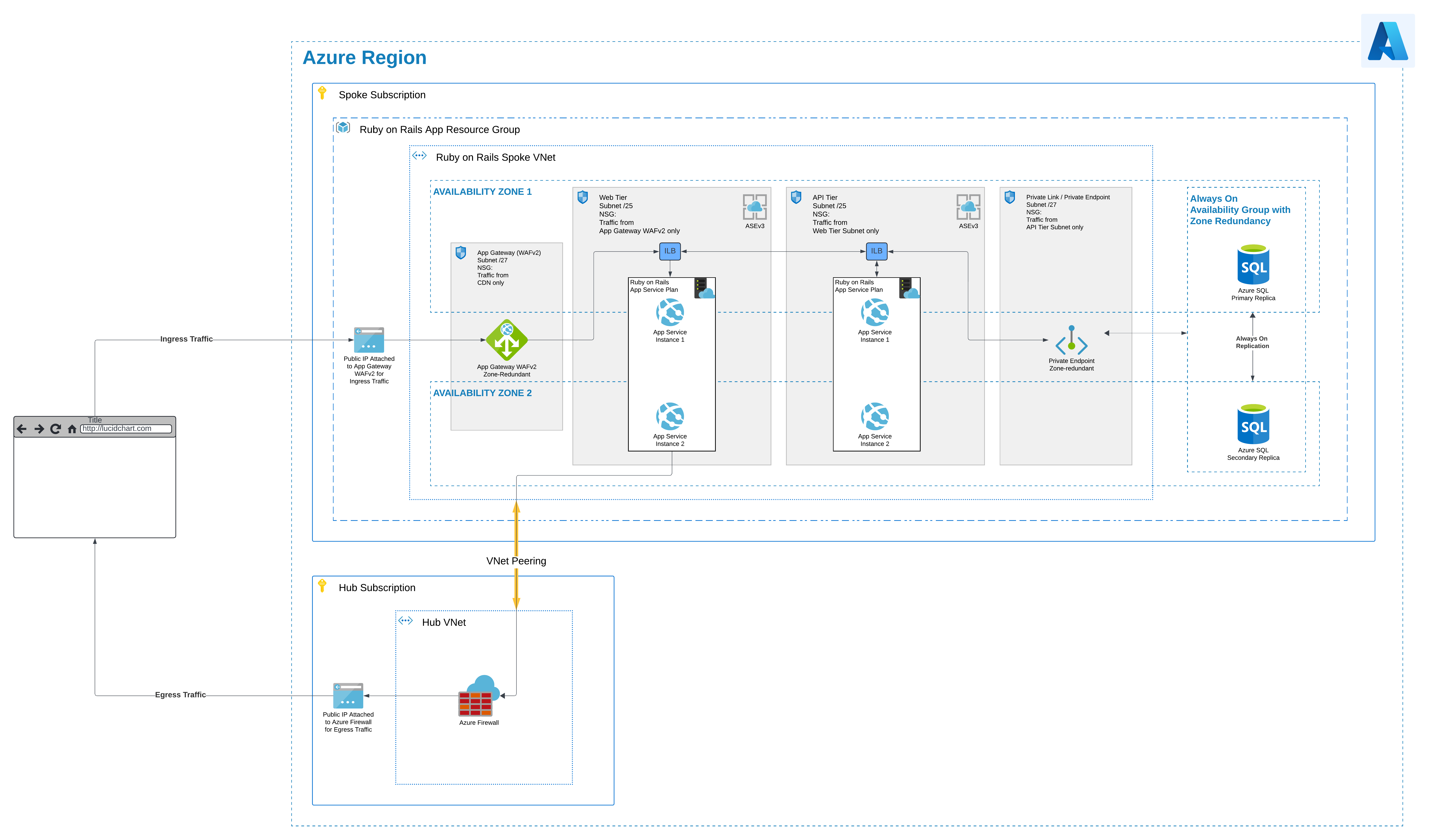
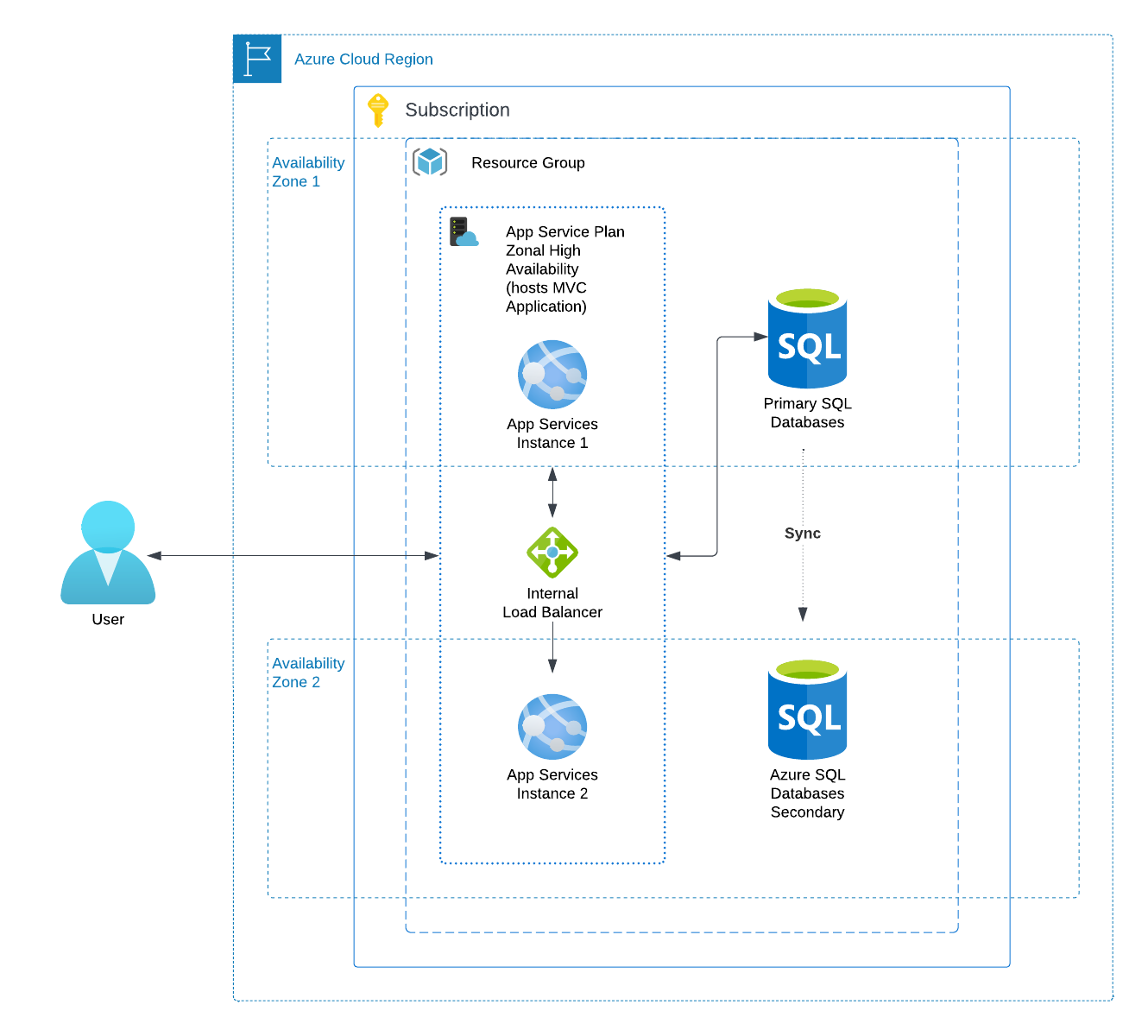
<p>First, we’ll require a Hub-and-Spoke architecture.  Most LOB (line of business) applications should be separated into their own subscriptions and as a result their own virtual networks (VNets).  This creates an additional layer of security as it makes a blast radius of an attack smaller. Take a look at the <a href="https://learn.microsoft.com/en-us/azure/cloud-adoption-framework/ready/landing-zone/">Azure’s Cloud Adoption Framework Landing Zones</a> for a more detailed deep dive on this. The only public endpoint will be a public IP attached to an Application Gateway (Azure’s Layer 7 load balancer), which will use the WAFv2 SKU to protect incoming web traffic.  For application hosting, we should utilize an isolated <a href="https://learn.microsoft.com/en-us/azure/app-service/environment/overview">Internal Load Balancer (ILB) Application Serivce Environment (ASE)</a>. This will ensure private traffic for security.  App Services, Azure’s PaaS option, in an isolated environment can host a Ruby on Rails application either as a Linux web app or inside a Docker container. ASEs are great for workloads that require</p>
<ul>
  <li>High scale</li>
  <li>Isolation and secure network access</li>
  <li>High memory utilization</li>
  <li>High requests per second (RPS). You can create multiple App Service Environments in a single Azure region or across multiple Azure regions. This flexibility makes an App Service Environment ideal for horizontally scaling stateless applications with a high RPS requirement.</li>
</ul>

<p>Additionally, to further keep traffic private, we’ll utilize Private Endpoints to connect to an Azure SQL database.  This combination offers full control of traffic flow, and is completely isolated over private network connections within a single LOB VNet with private IPs. This demonstrates network enclaving and offers protection and reduces the blast radius should an attack by a malicious actor occur.</p>

<p>Finally, in order to satisfy our HA requirement for this business-critical application, we’ll utilize zone-redundant deployments for all of our resources.</p>

<figure>
    <a href="/assets/images/paas-showdown-azure.png"><img src="/assets/images/paas-showdown-azure.png" /></a>
	<figcaption>(Click to enlarge!)</figcaption>
</figure>

<h3 id="pros">Pros</h3>
<ul>
  <li>Team is familiar with and currently uses Azure</li>
  <li>Network enclaving increases security and reduces risk</li>
  <li>Fine-grained security control</li>
  <li>Better performance, especially when both application and database are hosted on Azure</li>
  <li>Integration with Microsoft Ecosystem</li>
</ul>

<h3 id="cons">Cons</h3>
<ul>
  <li>App Service support for Ruby has ended, requiring containerization</li>
  <li>Infrastructure complexity</li>
  <li>Management overhead</li>
</ul>

<h2 id="architecture-option-2">Architecture Option 2</h2>
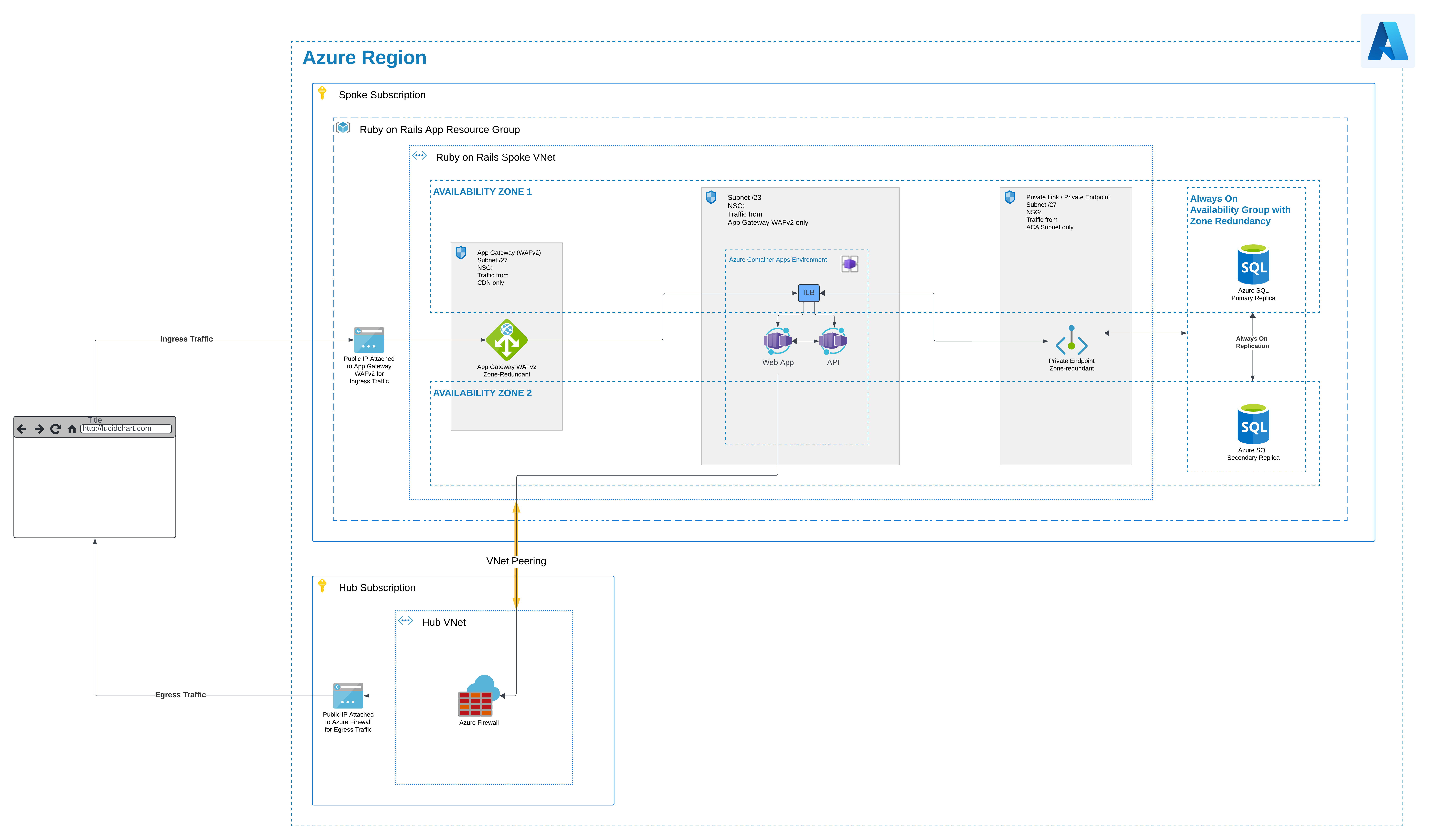
<p>Another similar option to ASEs represents Azure Container Apps (ACA).  Ever wanted to deploy your containers to Kubernetes but found all the plumbing too complicated?  This is where ACA comes in as a managed Kubernetes platform.  Whereas Azure Kubernetes Service (AKS) only abstracts away the Kubernetes control plane, ACA takes it a step further and also abstracts away everything else.  ACA represents a fully managed Kubernetes PaaS.  Most of the architecture will be similar to our ASE architecture above, but now instead of App Services, we are using ACA containers.  The architecture appears simpler, cleaner. We maintain security through enclaving and deploying the ACA into an existing VNet with existing security controls.  For more information on this see <a href="https://learn.microsoft.com/en-us/azure/container-apps/networking?tabs=workload-profiles-env%2Cazure-cli#environment-security">Azure Container Apps Environment Security</a>.</p>

<figure>
    <a href="/assets/images/paas-showdown-azure-aca.png"><img src="/assets/images/paas-showdown-azure-aca.png" /></a>
	<figcaption>(Click to enlarge!)</figcaption>
</figure>

<h3 id="pros-1">Pros</h3>
<ul>
  <li>Team is familiar with and currently uses Azure</li>
  <li>Network enclaving increases security and reduces risk</li>
  <li>Fine-grained security control</li>
  <li>Better performance, especially when both application and database are hosted on Azure</li>
  <li>Integration with Microsoft Ecosystem</li>
  <li>Includes functionality for auto-scaling and versioning</li>
</ul>

<h3 id="cons-1">Cons</h3>
<ul>
  <li>Kubernetes-specific knowledge still required to reap most benefits</li>
  <li>Infrastructure complexity</li>
  <li>Management overhead</li>
</ul>

<h1 id="option-2-heroku">Option 2: Heroku</h1>

<h2 id="architecture-option-1-1">Architecture Option 1</h2>

<p>The combination of Heroku application hosting and Azure database hosting creates additional complexity.  For security, right out of the gate we want to use Heroku Shield Spaces.  This will offer isolation and security similar to Azure Application Service Environments (ASEs) or Azure Container App (ACA) Environments for isolated hosting.  Here are the major selling points for <a href="https://www.heroku.com/shield">Heroku Shield</a>:</p>
<ul>
  <li>Dedicated environment for high compliance apps</li>
  <li>Ability to sign BAAs for HIPAA compliance</li>
  <li>PCI compliance</li>
  <li>Keystroke logging</li>
  <li>Space level log drains</li>
  <li>Strict TLS enforcement</li>
</ul>

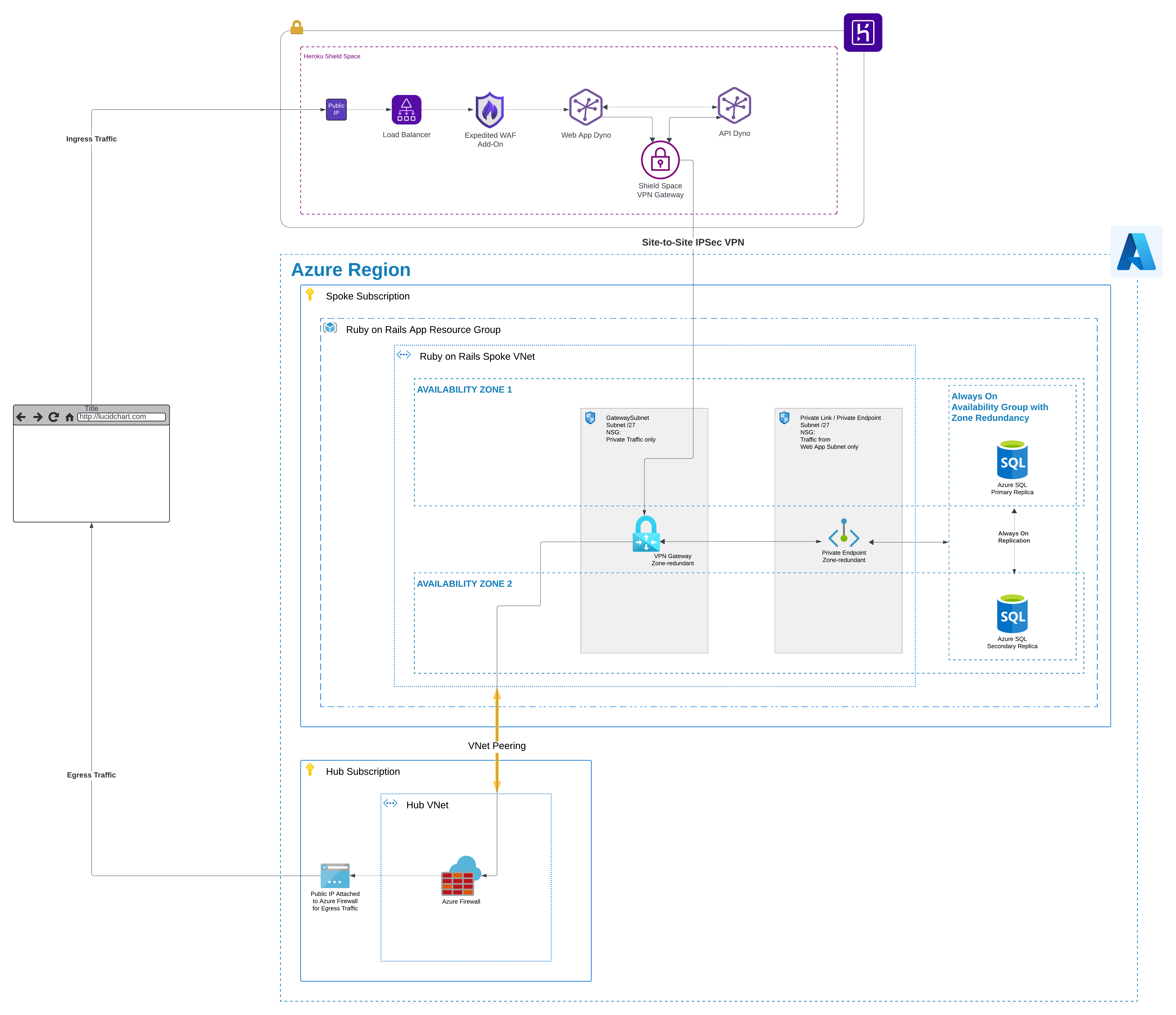
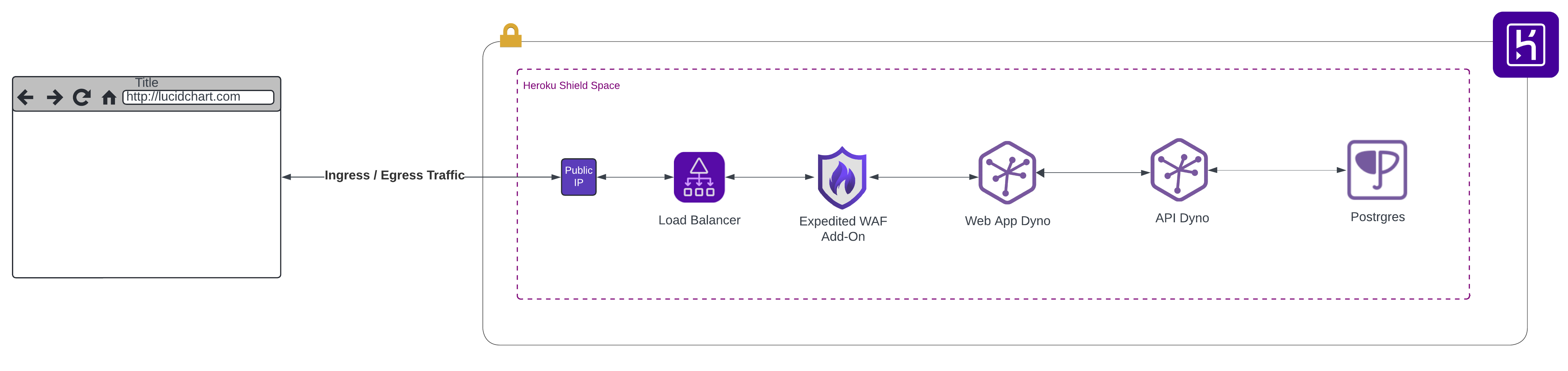
<p>However, we still need to ensure network enclaving for Azure and individual VNets for LOB applications.  Additionally, we’ll need to secure traffic in transit between our Ruby on Rails application hosted in Heroku and our database hosted in Azure.  For this, we’ll use a Site-to-Site VPN at a minimum.  Heroku offers this very capability with <a href="https://devcenter.heroku.com/articles/private-space-vpn-connection">Shield Space VPN Connections</a>. This VPN tunnel offers redundancy and IPSec encryption. (Another option would be to use HTTPS/TLS encrypted traffic, but this would not only introduce additional latency, it would also let our sensitive data flow accross the internet.  This is the least desirable option and I would not recommend this.)</p>

<p>Finally, we’ll also need to still utilize the same Site-to-Site VPN tunnel for egress traffic from Heroku through our Azure VNet in order to only expose one public business IP address using SNAT.</p>

<figure>
    <a href="/assets/images/paas-showdown-heroku.png"><img src="/assets/images/paas-showdown-heroku.png" /></a>
	<figcaption>(Click to enlarge!)</figcaption>
</figure>

<h3 id="pros-2">Pros</h3>
<ul>
  <li><a href="https://www.heroku.com/shield">Heroku Shield</a> is offered for high compliance applications</li>
  <li>Ruby applications can run natively and do not require containerization</li>
  <li>Managed infrastructure offers simplicity</li>
  <li>Applications can be up and running fast</li>
</ul>

<h3 id="cons-2">Cons</h3>
<ul>
  <li>Limited control due to managed infrastructure</li>
  <li>Complicated network routing with additional hops and points of failure between Heroku and Azure</li>
  <li>Degraded performance due to additional Site-to-Site VPN hops, which introduce additional latency</li>
  <li>Increased security risk because traffic flows over open internet, even though it is encrypted over a VPN tunnel</li>
  <li>Team has not worked with Heroku</li>
  <li>Potential for vendor lock-in</li>
</ul>

<h2 id="architecture-option-2-1">Architecture Option 2</h2>

<p>But what would our Heroku architecture look like if both our web app <em>and</em> database were hosted in Heroku? As can be seen in the diagram below, this represents a massive simplification of the architecture.  Not only do we drop the need to containerize our Ruby on Rails application as is the case with Azure PaaS services, but now we can also utilize <a href="https://devcenter.heroku.com/articles/heroku-postgres-and-private-spaces">Heroku Postgres for Shield Spaces</a>.  Our entire architecture can now be hosted in Heroku, inside an isolated, secure environment built specifically for high compliance applications.</p>

<figure>
    <a href="/assets/images/paas-showdown-heroku-db.png"><img src="/assets/images/paas-showdown-heroku-db.png" /></a>
	<figcaption>(Click to enlarge!)</figcaption>
</figure>

<h3 id="pros-3">Pros</h3>
<ul>
  <li><a href="https://www.heroku.com/shield">Heroku Shield</a> is offered for high compliance applications</li>
  <li>Ruby applications can run natively and do not require containerization</li>
  <li>Managed infrastructure offers simplicity</li>
  <li>Applications can be up and running fast</li>
  <li>Heroku Postgres for Shield Spaces addition massively simplifies architecture</li>
</ul>

<h3 id="cons-3">Cons</h3>
<ul>
  <li>Limited control due to managed infrastructure</li>
  <li>Team has not worked with Heroku</li>
  <li>Potential for vendor lock-in</li>
</ul>

<h1 id="recommendation">Recommendation</h1>

<p>The choice between Azure and Heroku application hosting for Ruby on Rails depends on project size, complexity, priorities, level of needed control and business direction. Azure offers ASEs and ACAs as PaaS options for performance and high scale through isolation.  This is ideal for larger, complex applications requiring flexibility, scalability and fine-grained control.   Similarly, a team’s familiarity and built-out processes currently existing with Azure should not be discounted, because migrating those to Heroku could introduce additional cost and risk.</p>

<p>However, Heroku could offer faster application deployments for tasks such as prototyping and proof of concepts. Heroku is great for simplicity and fast deployment, because it does not require containerization for Ruby on Rails applications. In addition, if we drop the requirement to keep data on Azure, Heroku offers a clear choice - it massively simplifies the cloud architecture and maintainability. However, if there is a hard requirement to keep data within Azure, this creates additional complexity and really handicaps Heroku as a choice, because a Site-to-Site VPN would degrade performance and decrease security.</p>

<p>In the end, if a team currently uses containers to deploy a Ruby on Rails application, and absolutely <em>must</em> maintain data within Azure, I would stick to either Azure PaaS offering for web app hosting - Azure Application Service Environments or Azure Container Appps. The added overhead of setting up and maintaining a Site-to-Site VPN between Heroku and Azure really opens up security risks and decreases performance. However, without the data in Azure requirement, Heroku would present a clear winner and a much better choice for developer experience, decreased management overhead and deployment simplicity.  The choice depends on data hosting preference, future business direction and a more detailed price comparison.</p>]]></content><author><name>Almir Banjanovic</name></author><category term="blog" /><category term="Cloud" /><summary type="html"><![CDATA[Which platform choice is better for hosting applications - Azure or Heroku? Let's dive in and find out!]]></summary></entry><entry><title type="html">Deploy Azure Kubernetes Service (AKS) using GitHub and Terraform</title><link href="https://www.theroadtocloud.com/blog/deploy-aks-with-terraform-and-oidc/" rel="alternate" type="text/html" title="Deploy Azure Kubernetes Service (AKS) using GitHub and Terraform" /><published>2024-03-22T00:00:00+00:00</published><updated>2024-03-22T00:00:00+00:00</updated><id>https://www.theroadtocloud.com/blog/deploy-aks-with-terraform-and-oidc</id><content type="html" xml:base="https://www.theroadtocloud.com/blog/deploy-aks-with-terraform-and-oidc/"><![CDATA[<figure class="align-left">
	<a href="/assets/images/aks-terraform-oidc.svg"><img src="/assets/images/aks-terraform-oidc.svg" /></a>
</figure>

<h1 id="tldr">TL;DR</h1>
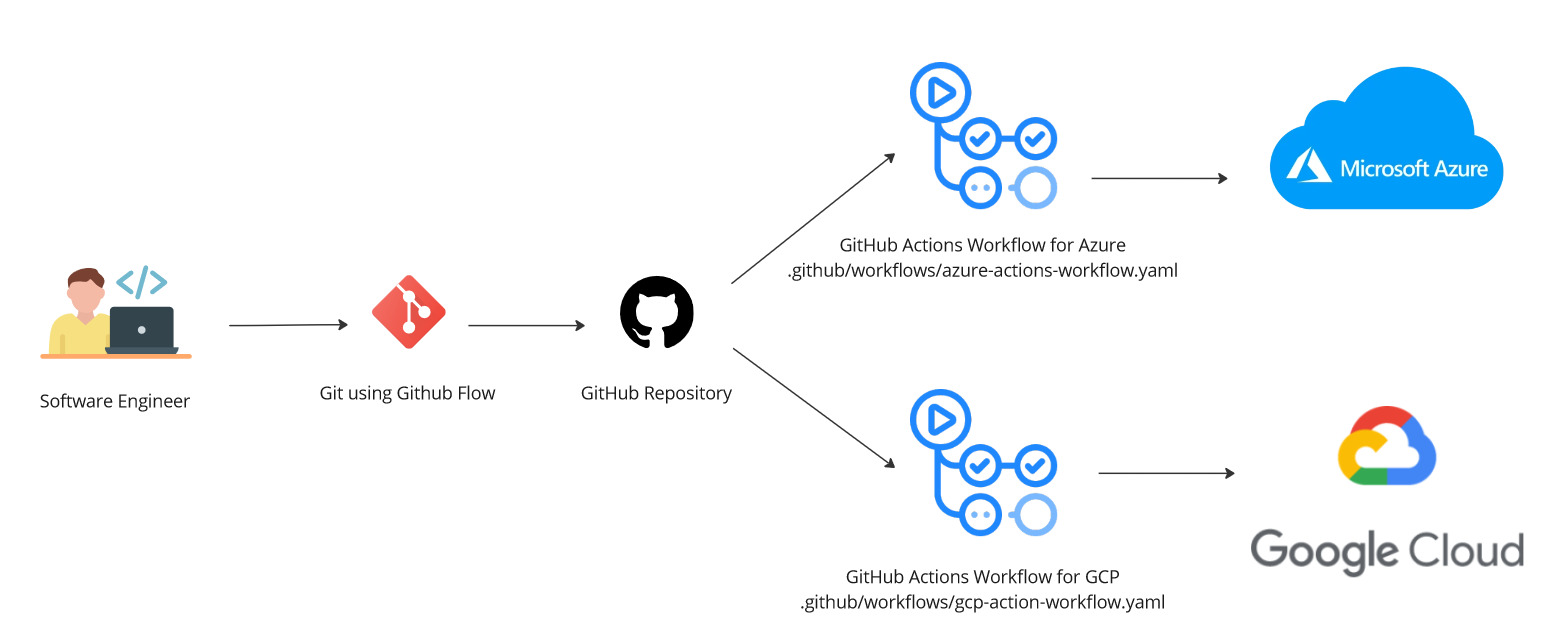
<p>If you wanna jump straight into it, check out my GitHub repository for this project <a href="https://github.com/rimlaban7/azure-kubernetes-service-terraform">here</a>.  This includes a step-by-step guide, including prerequisites, configuration and deployment of AKS using OIDC, Terraform, GitHub Actions.  The goal of this project is to demonstrate the three (3) main points below:</p>

<ol>
  <li>Use of OIDC for Microsoft Entra and GitHub Actions authentication,</li>
  <li>Use of Azure Storage Account as Terraform Backend for state storage, and</li>
  <li>Deployment of minimum viable product (MVP) Azure Kubernetes Service (AKS).
<br /></li>
</ol>

<h1 id="flexibility-portability-and-security-with-kubernetes-terraform-github-and-openid-connect-oidc">Flexibility, Portability and Security with Kubernetes, Terraform, GitHub, and OpenID Connect (OIDC)</h1>

<p>Let’s talk about something that sounds complicated but is actually not as bad as it might seem: deploying Azure Kubernetes Service (AKS) using Terraform, orchestrated through GitHub Actions. And the cherry on top? Let’s make this entire process seamless and more secure by integrating OpenID Connect (OIDC) for authentication. This will give your developer experience a major upgrade!</p>

<h2 id="keeping-it-simple-with-trunk-based-development">Keeping It Simple with Trunk-Based Development</h2>

<p>For this project, I kept is simple with a Trunk-Based Development strategy. Simply put, it honestly makes the most sense for a single person, or a very small highly skilled team working on a project.  For a complete overview of all the different ways you can structure your repositories and workflow strategies, see my blog post on <a href="https://www.theroadtocloud.com/blog/branching-strategies/">Branching Strategies</a>.</p>

<h2 id="goodbye-passwords-hello-oidc">Goodbye Passwords, Hello OIDC</h2>

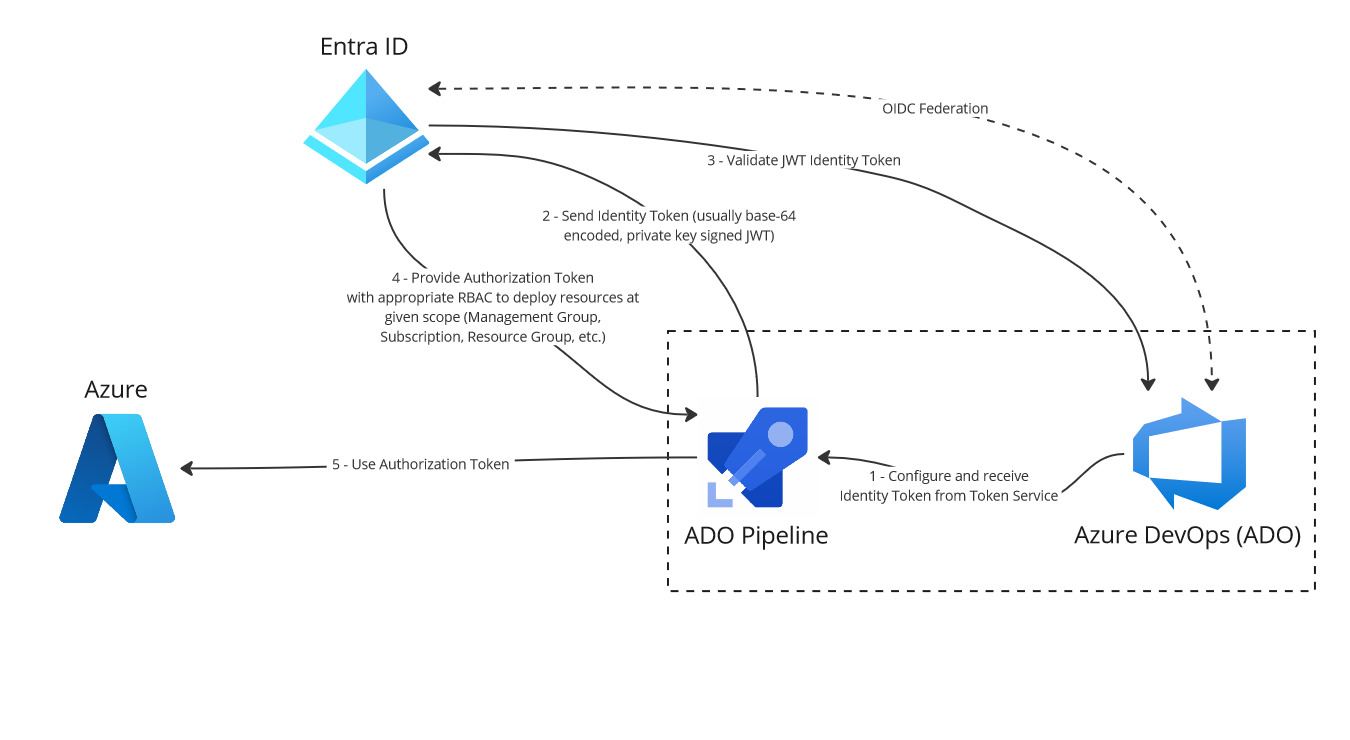
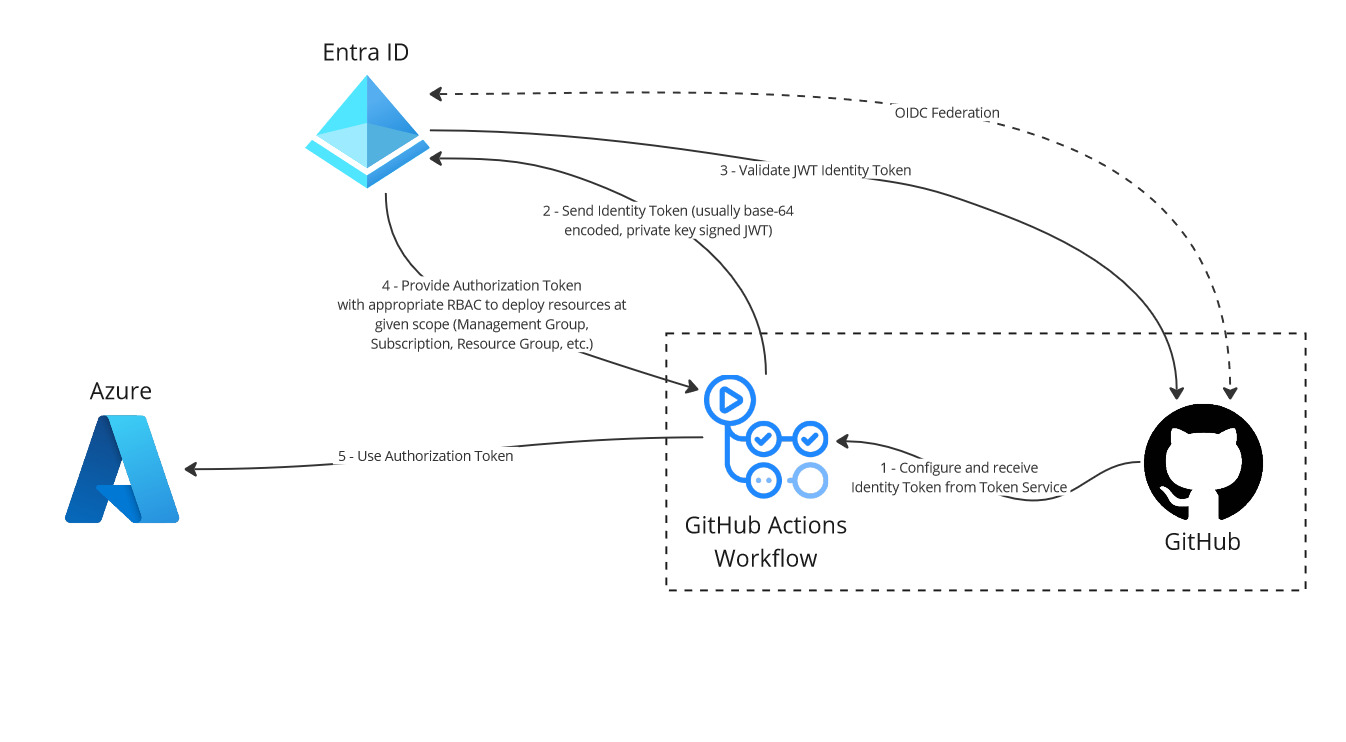
<p>Imagine deploying infrastructure without worrying about safeguarding a pile of secrets or passwords. From an engineer’s or software developer’s lense, this presents a host of challenges.  How do you store, manage and rotate those secrets and passwords? Thanks to OIDC, that daunting endeavor is a thing of the past! OIDC simplifies authenticating with Azure, meaning less time fretting over security and more time doing what you love: crafting great code. It’s a smarter, streamlined way to work, and honestly, who doesn’t want that?  For more information on how OIDC works with Entra, Azure, GitHub and Azure DevOps, see my blog post titled <a href="https://www.theroadtocloud.com/blog/github-and-azure-devops-oidc-authentication/">Authenticating GitHub and Azure DevOps using OpenID Connect</a>.  This project uses OIDC. It just makes sense.</p>

<h2 id="flexibility-and-portability">Flexibility and Portability</h2>

<h3 id="kubernetes">Kubernetes</h3>
<p>Why make a big deal about Kubernetes, or K8s as the cool kids call it? Simply put, it gives you the flexibility to manage your applications with ease, regardless of where you choose to run them. The major Cloud Service Providers (CSPs) have all jumped on board - Microsoft with Azure Kubernetes Service (AKS), AWS with Elastic Kubernetes Service (EKS), and Google Cloud Platform (GCP) with Google Kubernetes Service (GKS). Think of K8s as your cloud Swiss Army knife, ready to adapt to whatever your project needs. K8s represents a cloud-agnostic service, pitting the major CSPs against each other to earn your business.  Competition is a good thing for the consumer (i.e. you and me!).</p>

<h3 id="terraform">Terraform</h3>
<p>Finally, what’s all the Terraform fuss about?  Some might say - can’t I just use Azure Resource Manager (ARM) Templates?  Well, technically, yes.  But when you learn Terraform, a cross-CSP Infrastructure as Code (IaC) declarative deployment tool, it enables flexibility for IaC just like K8s does for application hosting.  A CSP decides to raise prices for infrastrucuture?  Don’t fret, take your Terraform and Kubernetes knowledge to another vendor! Once again, competition is the name of the game.  Let’ the CSPs compete for your business!</p>

<h1 id="why-this-all-matters">Why This All Matters</h1>

<p>Let’s make sure we hit the point of this post home.  In the grand scheme of things, embracing tools such as OIDC, Kubernetes, Terraform and GitHub is about remaining flexible and secure in a technology landscape that is evolving at a rapid pace. It’s about ensuring that as developers, architects, or managers, we’re not just keeping pace but setting the pace, ready to adapt and thrive no matter what comes our way.</p>

<p>So, here’s to making deployment a smoother, more secure part of our development journey. Ready to take the next step? Let’s dive in and see just how much easier and more enjoyable your work can become.  Check out the entire repo <a href="https://github.com/rimlaban7/azure-kubernetes-service-terraform">here</a>!</p>]]></content><author><name>Almir Banjanovic</name></author><category term="blog" /><category term="Cloud" /><category term="Programming" /><category term="DevOps" /><summary type="html"><![CDATA[Let's deploy Azure Kubernetes Service (AKS) using GitHub and Terraform!]]></summary></entry><entry><title type="html">Brewing Healthy Cloud Applications</title><link href="https://www.theroadtocloud.com/blog/cloud-and-thread-safe-code/" rel="alternate" type="text/html" title="Brewing Healthy Cloud Applications" /><published>2024-03-04T00:00:00+00:00</published><updated>2024-03-04T00:00:00+00:00</updated><id>https://www.theroadtocloud.com/blog/cloud-and-thread-safe-code</id><content type="html" xml:base="https://www.theroadtocloud.com/blog/cloud-and-thread-safe-code/"><![CDATA[<figure class="align-left">
	<a href="/assets/images/cloud-code-coffee.jpg"><img src="/assets/images/cloud-code-coffee.jpg" /></a>
</figure>

<h1 id="introduction">Introduction</h1>
<p>One common misconception is that highly-available, resilient and elastic cloud architectures represent a silver bullet.  This is not necessarily the case.  Cloud architecture is tightly coupled to healthy programming techniques - a healthy cloud architecture and healthy code hosted on those architectues are two sides of the same coin.  This fundamental concept often gets lost.  Consider having the most resilient, multi-AZ (Availability Zone), multi-Region cloud architecture that unscrupulously autoscales additional nodes horizontally to handle additional load caused by sudden spikes of REST API calls.  Now also consider that these additional calls are caused by unhealthy code. This is not only inefficient and can crash a REST API, but it can also crash an entire cloud infrastructure and cause runaway costs incurred by additional horizontal scaling.  In this post, let’s examine healthy programming techniques such as reusing HTTP connections and building thread-safe code with a coffee shop metaphor.</p>

<p>In the world of software development, optimizing cloud application performance, especially REST APIs, is similar to managing a highly efficient coffee shop. Just as a coffee shop tries to serve as many customers as efficiently as possible, cloud applications try to handle requests and tasks effectively. What can coffee shops teach us about reusing HTTP connections, thread-safe programming, avoiding deadlocks, and employing the singleton pattern for better performance and resource management? Let’s dive in!</p>

<h1 id="reusing-http-connections-the-art-of-efficient-service">Reusing HTTP Connections: The Art of Efficient Service</h1>
<p>Imagine as soon as you walk into your favorite coffee shop, the barista immediately serves your favorite coffee from a large coffee pot.  I’d call that efficient service.</p>

<p>Creating a new connection for each HTTP request (similar to grinding new coffee beans for every cup) can put additional load on your web servers, aka cloud compute nodes. This can quickly overwhelm a node in a cloud architecture, causing autoscaling to kick in. Modern HTTP client libraries use connection pooling, similar to a coffee shop having a large pot of coffee ready to serve multiple customers quickly. This approach minimizes the overhead of establishing new connections for every request, similar to avoiding the time-consuming process of grinding beans and brewing coffee for every single cup of coffee.</p>

<h2 id="singleton-pattern-one-coffee-machine-to-serve-them-all">Singleton Pattern: One Coffee Machine to Serve Them All</h2>
<p>The singleton pattern in software development is like having a single, highly efficient coffee machine in a shop that all baristas share. This pattern ensures that only one instance of a resource (e.g., an <code class="language-plaintext highlighter-rouge">HttpClient</code> in .NET) is created and reused across the application, optimizing resource cloud hosting cost and avoiding runaway autoscaling of cloud compute nodes.</p>

<h2 id="dependency-injection-di">Dependency Injection (DI)</h2>
<p>Use dependency injection to implement the singleton pattern - it is like a coffee shop where the manager ensures that all baristas use the same coffee machine, maintaining efficiency and consistency. It allows for flexible configuration and easy sharing of the coffee machine (or <code class="language-plaintext highlighter-rouge">HttpClient</code>) across different parts of the application.</p>

<p>In a .NET Core or .NET 5/6/7/8 application, you can use the built-in DI container to manage <code class="language-plaintext highlighter-rouge">HttpClient</code> instances efficiently. This approach ensures that <code class="language-plaintext highlighter-rouge">HttpClient</code> instances are reused properly, which is crucial for managing connections and resources effectively.</p>

<p><strong>Step 1: Define Typed Client</strong></p>

<p>First, create a class that will serve as your typed client. This class will encapsulate all logic for making HTTP requests to a specific external service.</p>

<figure class="highlight"><pre><code class="language-csharp" data-lang="csharp"><span class="k">using</span> <span class="nn">System.Net.Http</span><span class="p">;</span>
<span class="k">using</span> <span class="nn">System.Threading.Tasks</span><span class="p">;</span>

<span class="k">public</span> <span class="k">class</span> <span class="nc">CoffeeServiceClient</span>
<span class="p">{</span>
    <span class="k">private</span> <span class="k">readonly</span> <span class="n">HttpClient</span> <span class="n">_httpClient</span><span class="p">;</span>

    <span class="k">public</span> <span class="nf">CoffeeServiceClient</span><span class="p">(</span><span class="n">HttpClient</span> <span class="n">httpClient</span><span class="p">)</span>
    <span class="p">{</span>
        <span class="n">_httpClient</span> <span class="p">=</span> <span class="n">httpClient</span><span class="p">;</span>
        <span class="c1">// Assuming the external service requires an API key in the header</span>
        <span class="n">_httpClient</span><span class="p">.</span><span class="n">DefaultRequestHeaders</span><span class="p">.</span><span class="nf">Add</span><span class="p">(</span><span class="s">"ApiKey"</span><span class="p">,</span> <span class="s">"YourApiKeyHere"</span><span class="p">);</span>
	<span class="c1">// Other configuration goes here</span>
    <span class="p">}</span>

    <span class="k">public</span> <span class="k">async</span> <span class="n">Task</span><span class="p">&lt;</span><span class="kt">string</span><span class="p">&gt;</span> <span class="nf">GetCoffeeAsync</span><span class="p">(</span><span class="kt">string</span> <span class="n">typeOfRoast</span><span class="p">)</span>
    <span class="p">{</span>
        <span class="kt">var</span> <span class="n">response</span> <span class="p">=</span> <span class="k">await</span> <span class="n">_httpClient</span><span class="p">.</span><span class="nf">GetAsync</span><span class="p">(</span><span class="s">$"coffee/</span><span class="p">{</span><span class="n">typeOfRoast</span><span class="p">}</span><span class="s">"</span><span class="p">);</span>
        <span class="n">response</span><span class="p">.</span><span class="nf">EnsureSuccessStatusCode</span><span class="p">();</span>
        <span class="k">return</span> <span class="k">await</span> <span class="n">response</span><span class="p">.</span><span class="n">Content</span><span class="p">.</span><span class="nf">ReadAsStringAsync</span><span class="p">();</span>
    <span class="p">}</span>
<span class="p">}</span></code></pre></figure>

<p><strong>Step 2: Configure the Typed Client in <code class="language-plaintext highlighter-rouge">Program.cs</code></strong>:</p>

<p>In your <code class="language-plaintext highlighter-rouge">Program.cs</code>, register the typed client with the dependency injection (DI) container using AddHttpClient. This method allows you to configure the HttpClient that will be injected into your typed client.</p>

<figure class="highlight"><pre><code class="language-csharp" data-lang="csharp"><span class="k">using</span> <span class="nn">Microsoft.AspNetCore.Builder</span><span class="p">;</span>
<span class="k">using</span> <span class="nn">Microsoft.Extensions.DependencyInjection</span><span class="p">;</span>
<span class="k">using</span> <span class="nn">Microsoft.Extensions.Hosting</span><span class="p">;</span>

<span class="kt">var</span> <span class="n">builder</span> <span class="p">=</span> <span class="n">WebApplication</span><span class="p">.</span><span class="nf">CreateBuilder</span><span class="p">(</span><span class="n">args</span><span class="p">);</span>

<span class="c1">// Register the typed client with HttpClient configured</span>
<span class="n">builder</span><span class="p">.</span><span class="n">Services</span><span class="p">.</span><span class="n">AddHttpClient</span><span class="p">&lt;</span><span class="n">CoffeeServiceClient</span><span class="p">&gt;(</span><span class="n">client</span> <span class="p">=&gt;</span>
<span class="p">{</span>
    <span class="n">client</span><span class="p">.</span><span class="n">BaseAddress</span> <span class="p">=</span> <span class="k">new</span> <span class="nf">Uri</span><span class="p">(</span><span class="s">"https://api.coffeeapi.com/v1/"</span><span class="p">);</span>
    <span class="c1">// Set other default configurations here</span>
<span class="p">});</span>

<span class="kt">var</span> <span class="n">app</span> <span class="p">=</span> <span class="n">builder</span><span class="p">.</span><span class="nf">Build</span><span class="p">();</span>

<span class="c1">// Map controllers and run app (assuming you're using controllers)</span>
<span class="n">app</span><span class="p">.</span><span class="nf">MapControllers</span><span class="p">();</span>

<span class="n">app</span><span class="p">.</span><span class="nf">Run</span><span class="p">();</span></code></pre></figure>

<p><strong>Step 3: Use the Typed Client in a Controller</strong></p>

<p>Inject the typed client into your controllers or services where you need to make HTTP requests.</p>

<figure class="highlight"><pre><code class="language-csharp" data-lang="csharp"><span class="k">using</span> <span class="nn">Microsoft.AspNetCore.Mvc</span><span class="p">;</span>
<span class="k">using</span> <span class="nn">System.Threading.Tasks</span><span class="p">;</span>

<span class="p">[</span><span class="n">ApiController</span><span class="p">]</span>
<span class="p">[</span><span class="nf">Route</span><span class="p">(</span><span class="s">"[controller]"</span><span class="p">)]</span>
<span class="k">public</span> <span class="k">class</span> <span class="nc">CoffeeController</span> <span class="p">:</span> <span class="n">ControllerBase</span>
<span class="p">{</span>
    <span class="k">private</span> <span class="k">readonly</span> <span class="n">CoffeeServiceClient</span> <span class="n">_coffeeServiceClient</span><span class="p">;</span>

    <span class="k">public</span> <span class="nf">CoffeeController</span><span class="p">(</span><span class="n">CoffeeServiceClient</span> <span class="n">coffeeServiceClient</span><span class="p">)</span>
    <span class="p">{</span>
        <span class="n">_coffeeServiceClient</span> <span class="p">=</span> <span class="n">coffeeServiceClient</span><span class="p">;</span>
    <span class="p">}</span>

    <span class="p">[</span><span class="nf">HttpGet</span><span class="p">(</span><span class="s">"{typeOfRoast}"</span><span class="p">)]</span>
    <span class="k">public</span> <span class="k">async</span> <span class="n">Task</span><span class="p">&lt;</span><span class="n">IActionResult</span><span class="p">&gt;</span> <span class="nf">Get</span><span class="p">(</span><span class="kt">string</span> <span class="n">typeOfRoast</span><span class="p">)</span>
    <span class="p">{</span>
        <span class="k">try</span>
        <span class="p">{</span>
            <span class="kt">var</span> <span class="n">data</span> <span class="p">=</span> <span class="k">await</span> <span class="n">_coffeeServiceClient</span><span class="p">.</span><span class="nf">GetCoffeeAsync</span><span class="p">(</span><span class="n">typeOfRoast</span><span class="p">);</span>
            <span class="k">return</span> <span class="nf">Ok</span><span class="p">(</span><span class="n">data</span><span class="p">);</span>
        <span class="p">}</span>
        <span class="k">catch</span> <span class="p">(</span><span class="n">HttpRequestException</span> <span class="n">e</span><span class="p">)</span>
        <span class="p">{</span>
            <span class="k">return</span> <span class="nf">StatusCode</span><span class="p">(</span><span class="m">500</span><span class="p">,</span> <span class="n">e</span><span class="p">.</span><span class="n">Message</span><span class="p">);</span>
        <span class="p">}</span>
    <span class="p">}</span>
<span class="p">}</span></code></pre></figure>

<p><br /></p>

<h1 id="thread-safe-programming-the-coordination-of-multiple-baristas">Thread-Safe Programming: The Coordination of Multiple Baristas</h1>
<p>In a busy coffee shop, multiple baristas (threads) work in parallel to serve customers efficiently. However, without proper coordination, they might bump into each other or duplicate efforts, leading to wasted resources and time. Similarly, in software applications, thread-safe programming ensures that multiple threads access shared resources (like a shared coffee machine) in a manner that prevents conflicts and ensures consistency.</p>

<h2 id="key-concepts">Key Concepts</h2>
<p>First, some key concepts, simplified:</p>

<ul>
  <li><strong>Synchronization Context</strong>: Imagine the coffee shop has a rule: When your coffee is ready, it must be handed to you personally, and you must receive it where you placed the order. This “personal handover” rule is like the synchronization context in programming, ensuring some tasks are completed in a specific “place” or thread.</li>
  <li><strong>Asynchronous Task (<code class="language-plaintext highlighter-rouge">async/await</code>)</strong>: An asynchronous task is like ordering a coffee at a busy coffee shop. You place your order (<code class="language-plaintext highlighter-rouge">async</code>) and then wait (<code class="language-plaintext highlighter-rouge">await</code>) for your name to be called when the coffee is ready. While waiting, you can do other things instead of standing still and blocking the line of other people wanting to order.</li>
  <li><strong>Blocking Calls (<code class="language-plaintext highlighter-rouge">.Result</code> or <code class="language-plaintext highlighter-rouge">.Wait()</code>)</strong>: This is like insisting on standing at the counter, staring at the barista uncomfortably until your coffee is ready, not doing anything else, and not letting anyone else order.</li>
</ul>

<h2 id="deadlock-scenario-the-uncomfortable-stare">Deadlock Scenario: The Uncomfortable Stare</h2>
<p>This example demonstrates how using <code class="language-plaintext highlighter-rouge">.Result</code> or <code class="language-plaintext highlighter-rouge">.Wait()</code> in a context where the synchronization context is captured can lead to a deadlock:
<br /></p>

<figure class="highlight"><pre><code class="language-csharp" data-lang="csharp"><span class="p">[</span><span class="nf">HttpGet</span><span class="p">(</span><span class="s">"{typeOfRoast}"</span><span class="p">)]</span>
<span class="k">public</span> <span class="n">IActionResult</span> <span class="nf">Get</span><span class="p">(</span><span class="kt">string</span> <span class="n">typeOfRoast</span><span class="p">)</span>
<span class="p">{</span>
    <span class="k">try</span>
    <span class="p">{</span>
        <span class="c1">// Incorrectly using .Result can lead to a deadlock</span>
        <span class="kt">var</span> <span class="n">data</span> <span class="p">=</span> <span class="n">_coffeeServiceClient</span><span class="p">.</span><span class="nf">GetCoffeeAsync</span><span class="p">(</span><span class="n">typeOfRoast</span><span class="p">).</span><span class="n">Result</span><span class="p">;</span>
        <span class="k">return</span> <span class="nf">Ok</span><span class="p">(</span><span class="n">data</span><span class="p">);</span>
    <span class="p">}</span>
    <span class="k">catch</span> <span class="p">(</span><span class="n">HttpRequestException</span> <span class="n">e</span><span class="p">)</span>
    <span class="p">{</span>
        <span class="k">return</span> <span class="nf">StatusCode</span><span class="p">(</span><span class="m">500</span><span class="p">,</span> <span class="n">e</span><span class="p">.</span><span class="n">Message</span><span class="p">);</span>
    <span class="p">}</span>
<span class="p">}</span></code></pre></figure>

<p><br /></p>

<ol>
  <li>
    <p><strong>Placing the Order (Calling the Async Method)</strong>: You go to the coffee shop and order a coffee (call an asynchronous method, GetCoffeeAsync). The coffee shop is busy (the system is doing work), so you’re told to wait for your name to be called (the async operation will complete in the future).</p>
  </li>
  <li>
    <p><strong>Waiting for the Coffee (Awaiting the Async Task)</strong>: Instead of waiting normally, you decide to stand at the counter, not move and stare at the barista uncomfortably until you get your coffee (using .Result or .Wait()), effectively blocking anyone else from ordering (blocking the main thread).</p>
  </li>
  <li>
    <p><strong>The Coffee Shop Rule (Synchronization Context)</strong>: The coffee shop has a rule: Coffee must be handed to you personally at the counter (the continuation after an await must happen on the original synchronization context, or thread). But, because you’re blocking the counter (the main thread), the barista can’t serve anyone else, nor can they complete your order, because they need you to step aside to finish it (the async operation needs the blocked thread to continue).</p>
  </li>
  <li>
    <p><strong>The Deadlock</strong>: You’re waiting for your coffee to be ready before you move (waiting for the async operation to complete), but the coffee shop can’t finish making your coffee until you stop blocking the counter and stop making the barista uncomfortable with your stare (the system can’t complete the async operation because it’s waiting for the blocked thread to become available). As a result, everything stops. You’re not moving. The barista can’t serve your coffee. No one else can order. This standstill is the deadlock.</p>
  </li>
</ol>

<h2 id="avoiding-deadlocks">Avoiding Deadlocks</h2>
<p>To avoid the deadlock, you can ensure that the asynchronous method is allowed to complete without blocking the main thread. Here’s how you can do it:
<br /></p>

<figure class="highlight"><pre><code class="language-csharp" data-lang="csharp"><span class="p">[</span><span class="nf">HttpGet</span><span class="p">(</span><span class="s">"{typeOfRoast}"</span><span class="p">)]</span>
<span class="k">public</span> <span class="k">async</span> <span class="n">Task</span><span class="p">&lt;</span><span class="n">IActionResult</span><span class="p">&gt;</span> <span class="nf">Get</span><span class="p">(</span><span class="kt">string</span> <span class="n">typeOfRoast</span><span class="p">)</span>
<span class="p">{</span>
    <span class="k">try</span>
    <span class="p">{</span>
        <span class="c1">// Properly awaiting the asynchronous operation</span>
        <span class="kt">var</span> <span class="n">data</span> <span class="p">=</span> <span class="k">await</span> <span class="n">_coffeeServiceClient</span><span class="p">.</span><span class="nf">GetCoffeeAsync</span><span class="p">(</span><span class="n">typeOfRoast</span><span class="p">);</span>
        <span class="k">return</span> <span class="nf">Ok</span><span class="p">(</span><span class="n">data</span><span class="p">);</span>
    <span class="p">}</span>
    <span class="k">catch</span> <span class="p">(</span><span class="n">HttpRequestException</span> <span class="n">e</span><span class="p">)</span>
    <span class="p">{</span>
        <span class="k">return</span> <span class="nf">StatusCode</span><span class="p">(</span><span class="m">500</span><span class="p">,</span> <span class="n">e</span><span class="p">.</span><span class="n">Message</span><span class="p">);</span>
    <span class="p">}</span>
<span class="p">}</span></code></pre></figure>

<p>Just like in the coffee shop, where you could wait for your coffee without blocking the counter (maybe sit down or step aside), programming has a way to avoid deadlocks.</p>

<ol>
  <li><strong>Use <code class="language-plaintext highlighter-rouge">await</code> properly</strong>: This is like waiting for your coffee without blocking the counter. You allow other customers to order, and the barista to serve other orders while yours is being prepared.</li>
  <li><strong><code class="language-plaintext highlighter-rouge">ConfigureAwait(false)</code></strong>: This tells the system, “I don’t need to receive my coffee exactly at the counter where I ordered. You can call my name, and I’ll pick it up wherever I am.” This means the continuation of your task doesn’t need to be on the original thread, avoiding the need for you to block any “place” or thread.</li>
</ol>

<h1 id="conclusion">Conclusion</h1>
<p>Just as the goal of a coffee shop is to serve its customers efficiently and effectively, the goal of software development is to create applications that handle tasks and requests with optimal performance. By drawing lessons from the operation of a coffee shop—reusing resources like HTTP connections, ensuring thread-safe programming, avoiding deadlocks, and efficiently managing shared resources through the singleton pattern—we can brew applications that stand out for their performance and reliability, much like a cup of finely crafted coffee.</p>]]></content><author><name>Almir Banjanovic</name></author><category term="blog" /><category term="Cloud" /><category term="Programming" /><category term="Architecture" /><summary type="html"><![CDATA[Let's dive into a coffee shop metaphor to illustrate building healthy cloud application.]]></summary></entry><entry><title type="html">Authenticating GitHub and Azure DevOps using OpenID Connect</title><link href="https://www.theroadtocloud.com/blog/github-and-azure-devops-oidc-authentication/" rel="alternate" type="text/html" title="Authenticating GitHub and Azure DevOps using OpenID Connect" /><published>2024-03-01T00:00:00+00:00</published><updated>2024-03-01T00:00:00+00:00</updated><id>https://www.theroadtocloud.com/blog/github-and-azure-devops-oidc-authentication</id><content type="html" xml:base="https://www.theroadtocloud.com/blog/github-and-azure-devops-oidc-authentication/"><![CDATA[<h1 id="introduction">Introduction</h1>

<p>What if I told you, we could improve developer exprience <strong>and</strong> security with DevOps pipelines?  Enter OpenID Connect (OIDC) to the rescue!  Read on for more info!</p>

<h2 id="traditional-secrets-management">Traditional Secrets Management</h2>
<p>Traditionally teams have used Entra ID (formerly Azure AD, RIP) service principals to allow Azure DevOps and GitHub Workflows to deploy resources using Azure Resource Manager to Azure.  This included setting up App Registrations, which are service principals with appropriate role-based access controls (RBAC).  This is still documented in Microsoft’s documentation <a href="https://learn.microsoft.com/en-us/azure/devops/pipelines/library/connect-to-azure?view=azure-devops#create-an-azure-resource-manager-service-connection-that-uses-a-service-principal-secret">here</a>.</p>

<p>The problem with this approach is that now we are creating a client secret, basically a password, which has to be stored, managed and secured somewhere, just like any other password.  This could be Azure KeyVault or HashiCorp Vault.  This creates a security risk, in case this client secret (password) gets exposed.  This also presents a developer experience that is not ideal.</p>

<h2 id="a-better-approach-with-oidc">A Better Approach with OIDC</h2>
<p>A solution that is becoming increasingly popular involves using token exchange with OpenID Connect (OIDC). Microsoft even recommends this in their latest and greatest <a href="https://docs.github.com/en/actions/deployment/security-hardening-your-deployments/about-security-hardening-with-openid-connect">documentation</a>:</p>

<blockquote>
  <p>However, using hardcoded secrets requires you to create credentials in the cloud provider and then duplicate them in GitHub as a secret. With OpenID Connect (OIDC), you can take a different approach by configuring your workflow to request a short-lived access token directly from the cloud provider. Your cloud provider also needs to support OIDC on their end, and you must configure a trust relationship that controls which workflows are able to request the access tokens. Providers that currently support OIDC include Amazon Web Services, Azure, Google Cloud Platform, and HashiCorp Vault, among others.</p>
</blockquote>

<p>A step-by-step guide to configure OIDC using Workload Identity Federation can be found <a href="https://learn.microsoft.com/en-us/azure/devops/pipelines/library/connect-to-azure?view=azure-devops#create-an-azure-resource-manager-service-connection-that-uses-workload-identity-federation">here</a>.</p>

<h1 id="azure-devops-entra-id-oidc-authentication">Azure DevOps, Entra ID OIDC Authentication</h1>
<p>A picture is worth a thousand words.  I’ve laid out the authentication flow in the diagram below for Azue DevOps.  No more secrets management!</p>

<h2 id="azure-devops-entra-id-azure-flow">Azure DevOps, Entra ID, Azure Flow</h2>
<figure>
    <a href="/assets/images/azure-devops-oidc.jpg"><img src="/assets/images/azure-devops-oidc.jpg" /></a>
</figure>

<h2 id="microsofts-john-savill-explains">Microsoft’s John Savill Explains</h2>
<p>Microsoft’s John Savill explains OIDC authentication with Workload Identity Federation in his awesome YouTube videos that I have linked below.</p>

<iframe width="560" height="315" src="https://www.youtube.com/embed/saTUeR_U3lA?si=r3OMGYwt5DVX3Iii" title="YouTube video player" frameborder="0" allow="accelerometer; autoplay; clipboard-write; encrypted-media; gyroscope; picture-in-picture; web-share" allowfullscreen=""></iframe>
<p><br /><br /></p>

<h1 id="github-entra-id-oidc-authentication">GitHub, Entra ID OIDC Authentication</h1>
<p>How does this flow look for GitHub and GitHub Actions Workflows?  Well pretty similar to Azure DevOps and Azure Pipelines.  Check it out, gone are secrets!</p>

<h2 id="github-entra-id-azure-flow">GitHub, Entra ID, Azure Flow</h2>
<figure>
    <a href="/assets/images/github-oidc.jpg"><img src="/assets/images/github-oidc.jpg" /></a>
</figure>

<h2 id="microsofts-john-savill-explains-1">Microsoft’s John Savill Explains</h2>
<p>Once again, also check out how John Savill explains this OIDC flow for GitHub.</p>

<iframe width="560" height="315" src="https://www.youtube.com/embed/XkhkkLBkAT4?si=faDeaiViVhgPyBxA" title="YouTube video player" frameborder="0" allow="accelerometer; autoplay; clipboard-write; encrypted-media; gyroscope; picture-in-picture; web-share" allowfullscreen=""></iframe>
<p><br /><br /></p>]]></content><author><name>Almir Banjanovic</name></author><category term="blog" /><category term="Cloud" /><category term="DevOps" /><category term="Security" /><summary type="html"><![CDATA[What if I told you, we could improve developer exprience **and** security with DevOps pipelines? Enter OpenID Connect (OIDC) to the rescue!]]></summary></entry><entry><title type="html">Deploying to Azure using GitHub Actions and Terraform Cloud</title><link href="https://www.theroadtocloud.com/blog/deploy-azure-function-using-github-and-terraform/" rel="alternate" type="text/html" title="Deploying to Azure using GitHub Actions and Terraform Cloud" /><published>2024-02-19T00:00:00+00:00</published><updated>2024-02-19T00:00:00+00:00</updated><id>https://www.theroadtocloud.com/blog/deploy-azure-function-using-github-and-terraform</id><content type="html" xml:base="https://www.theroadtocloud.com/blog/deploy-azure-function-using-github-and-terraform/"><![CDATA[<h1 id="azure-function-app-project">Azure Function App Project</h1>

<h2 id="overview">Overview</h2>

<p>This project demonstrates the deployment of an Azure Function App using Terraform, Terraform Cloud and GitHub Actions for CI/CD.  The full code can be found in my GitHub repo <a href="https://github.com/rimlaban7/azure-function-terraform">here</a>.</p>

<figure>
    <a href="/assets/images/github_terraform_azure_function.jpg"><img src="/assets/images/github_terraform_azure_function.jpg" /></a>
</figure>

<h2 id="prerequisites">Prerequisites</h2>

<p>Before you begin, you’ll need to have the following:</p>

<ul>
  <li>An Azure subscription.</li>
  <li>A GitHub account.</li>
  <li>A Terraform Cloud account, with a workspace configured and mapped to this repository.</li>
  <li>Azure CLI installed locally (for development and testing).</li>
  <li>Your favorite IDE - I prefer Visual Studio Code with the below extensions installed
    <ul>
      <li>GitHub Actions</li>
      <li>HashiCorp HCL</li>
      <li>HashiCorp Terraform</li>
    </ul>
  </li>
</ul>

<h2 id="configuration">Configuration</h2>

<h3 id="azure-subscription">Azure Subscription</h3>
<ol>
  <li><strong>Azure Service Principal</strong>: Create a service principal with <code class="language-plaintext highlighter-rouge">Contributor</code> access and configure it as a variable in Terraform Cloud. You can accomplish this in Azure Portal or via Azure CLI.  There are many guides out there for this.  A <code class="language-plaintext highlighter-rouge">Contributor</code> access is only appropriate for this tutorial.  You will want to adhere to the <em>Principle of Least Privilege</em> and only assign the necessary role-based access controls (RBAC) to deploy code to the appropriate scope.</li>
</ol>

<h3 id="terraform-cloud">Terraform Cloud</h3>

<ol>
  <li><strong>Workspace Setup</strong>: Ensure your Terraform Cloud workspace is set up and linked to your GitHub repository containing the Terraform configuration.</li>
  <li><strong>Variables</strong>: Configure the necessary environment variables and Terraform variables in your Terraform Cloud workspace. This includes Azure credentials, resource naming, and any other configurations specific to your deployment.</li>
  <li><strong>State Storage</strong>: Terraform Cloud will automatically manage the state of your infrastructure, providing a secure and collaborative environment for your team.</li>
</ol>

<h3 id="github-actions">GitHub Actions</h3>

<ol>
  <li><strong>Workflow Configuration</strong>: The <code class="language-plaintext highlighter-rouge">.github/workflows</code> directory contains the YAML files for GitHub Actions. These define the CI/CD pipeline. Changes are currently configured to only be manually deployed.  This is accomplished with a <code class="language-plaintext highlighter-rouge">workflow_dispatch</code> trigger in the GitHub actions workflows <code class="language-plaintext highlighter-rouge">plan-apply.yml</code> and <code class="language-plaintext highlighter-rouge">destroy.yml</code>.</li>
  <li><strong>Secrets</strong>: Set up the required secrets in your GitHub repository variable and secrets settings. This should include access tokens for Terraform Cloud <code class="language-plaintext highlighter-rouge">TF_API_TOKEN</code>.</li>
</ol>]]></content><author><name>Almir Banjanovic</name></author><category term="blog" /><category term="Cloud" /><category term="Programming" /><category term="DevOps" /><summary type="html"><![CDATA[Let's deploy an Azure Function using GitHub Actions and Terraform Cloud!]]></summary></entry><entry><title type="html">What exactly does CI/CD mean?</title><link href="https://www.theroadtocloud.com/blog/continuous-integration-delivery-deployment/" rel="alternate" type="text/html" title="What exactly does CI/CD mean?" /><published>2024-02-01T00:00:00+00:00</published><updated>2024-02-01T00:00:00+00:00</updated><id>https://www.theroadtocloud.com/blog/continuous-integration-delivery-deployment</id><content type="html" xml:base="https://www.theroadtocloud.com/blog/continuous-integration-delivery-deployment/"><![CDATA[<p>I often see people confusing the terms <em>Continuous Integration, Continuous Delivery</em> and <em>Continuous Deployment</em>.  Let’s break it down in simpler terms.</p>

<figure>
    <a href="/assets/images/continuous-integration-delivery-deployment.png"><img src="/assets/images/continuous-integration-delivery-deployment.png" /></a>
</figure>

<p>Continuous Integration (CI) involves developers merging their tested code into a common branch.  Depending on the branching strategy used, this can be as often as multiple times a day, or a few times a week.  The next phase is Continuous Delivery (CD).  Here, we need to make sure to package the code in an artifact and store it somewhere - this is our release artifact.  Finally, there is Continuous Deployment (CD).  This takes Continuous Delivery (CD) a step further by sending our finished release artifact out into the real world for people to use. It’s all about making things smoother and faster!</p>]]></content><author><name>Almir Banjanovic</name></author><category term="blog" /><category term="Cloud" /><category term="DevOps" /><category term="Programming" /><summary type="html"><![CDATA[I often see people confusing the terms *Continuous Integration, Continuous Delivery* and *Continuous Deployment*. Let's break it down in simpler terms.]]></summary></entry></feed>