
KAITO on AKS: Why Would You Use It Instead of Microsoft Foundry?
KAITO on AKS
I recently added a new playground to cloud-playground-infra: a fully automated KAITO-on-AKS environment.
By the way, you should also check out my other blog post on what cloud-playground-infra helps us do.
What is KAITO?
KAITO (Kubernetes AI Toolchain Operator) is an operator that automates AI/ML model inference and tuning workloads in Kubernetes. Microsoft has enabled KAITO on AKS. KAITO simplifies running AI/ML inference by:
- Automatic node provisioning - Spins up GPU/CPU nodes based on model requirements
- Model lifecycle management - Downloads weights, manages inference server lifecycle
- Preset models - Built-in support for popular models (Llama, Mistral, Falcon, Phi, etc.)
- Custom models - Deploy your own models from HuggingFace, Azure Blob Storage, Azure Files, or Azure ML Model Registry
- OpenAI-compatible API - Provides a standard interface for inference calls
KAITO on AKS vs. Microsoft Foundry
You might wonder: why use KAITO on AKS, when Microsoft Foundry offers thousands of models for inference? Well both approaches solve different problems. Some teams benefit from having both available, while others should choose carefully depending on which industry they serve. Microsoft Foundry is an excellent PaaS product. It gives customers a fully managed, secure, and production-ready platform for running LLMs without touching GPU infrastructure. So, how do we go about understanding when a Kubernetes-native approach like KAITO on AKS makes sense?
Side-by-Side Overview
| Consideration | KAITO on AKS | Microsoft Foundry |
|---|---|---|
| Service model | PaaS - you manage cluster and model deployments | PaaS - you consume models via APIs |
| Model selection | Full control - any model from HuggingFace, Azure Blob/Files, Azure ML Registry, or private registries | Curated catalog with regional availability limitations (not all models available in all regions) |
| Compliance | Easier to meet strict regulatory requirements (HIPAA, FedRAMP, etc.) | Depends on service compliance certifications |
| Data sovereignty | Models run in your cluster, data never leaves your network | Data sent to Microsoft-managed endpoints |
| Cost model | Pay for VM compute only, no per-token charges | Pay-per-token or provisioned throughput |
| Customization | Full control over inference parameters, batching, quantization | Limited to provider-exposed options |
| Latency | In-cluster inference, minimal network hops | Network round-trip to external endpoint |
When KAITO on AKS Makes Sense
Use KAITO on AKS when you need data to remain in your environment, want consistent compute-based costs, have strict compliance requirements, or need deep customization of how models run.
When Microsoft Foundry Makes Sense
Use Foundry when you want a fully managed experience, access to proprietary models like GPT‑4 or Claude, consumption-based pricing, and no GPU or cluster management.
Architecture
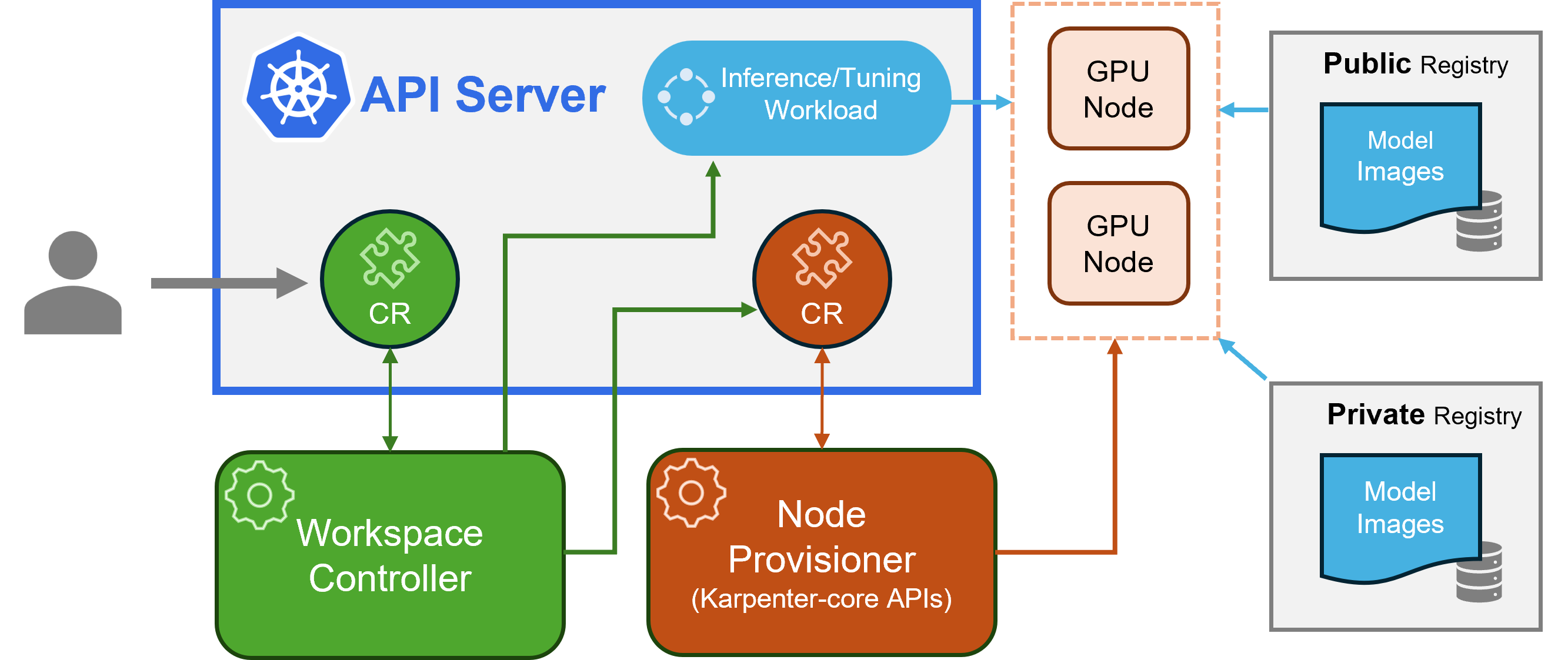
KAITO follows the classic Kubernetes CRD/controller pattern. Its major components are:
- Workspace controller - Reconciles the Workspace custom resource, triggers node provisioning via NodeClaim CRDs, and creates inference/tuning workloads based on model preset configurations
- Node provisioner controller (gpu-provisioner) - Uses Karpenter-core NodeClaim CRD to integrate with Azure Resource Manager APIs, automatically adding GPU nodes to AKS clusters
Source: Project KAITO
Preset Models
AKS has enabled support for several open-source models that can be deployed with minimal configuration using KAITO. Instead of defining a custom inference template, you simply specify the preset name in your workspace manifest.
| Model Family | Examples |
|---|---|
| DeepSeek | deepseek-r1 |
| Falcon | falcon-7b, falcon-40b |
| Gemma 3 | gemma-3-4b, gemma-3-12b, gemma-3-27b |
| Llama 3 | llama-3-8b, llama-3-70b, llama-3.1-8b, llama-3.1-70b, llama-3.1-405b |
| Mistral | mistral-7b, mistral-nemo-12b, mistral-large-2-123b |
| Phi 3 | phi-3-mini, phi-3-medium |
| Phi 4 | phi-4 |
| Qwen | qwen-2.5-7b, qwen-2.5-72b, qwen-2.5-coder-32b |
See the full list: KAITO Supported Models
Note: Preset models require GPU-enabled node pools. The current minimum requirement is
Standard_NC24ads_A100_v4. Ensure your Azure subscription has sufficient GPU quota. This POC uses a custom model on CPU instead, as GPU quota was not available.
An example preset manifest is available at assets/kubernetes/kaito_preset_model.yaml.
apiVersion: kaito.sh/v1beta1
kind: Workspace
metadata:
  name: ${name}
  namespace: ${namespace}
  # annotations:
  #   kaito.sh/enablelb: "True"  # Creates LoadBalancer service automatically (testing only, not for production)

resource:
  instanceType: ${instanceType} # Must be GPU-enabled instance type.  Ensure your subscription has quota.
  labelSelector:
    matchLabels:
      apps: ${appLabel}

inference:
  preset:
    name: ${presetName}
Custom Models
For more advanced deployments, see the example manifests in assets/kubernetes/:
| Manifest | Use Case |
|---|---|
kaito_custom_cpu_model.yaml |
Base template for public HuggingFace models for CPU VMs |
kaito_option1_hf_private.yaml |
Private/gated HuggingFace models with HF_TOKEN |
kaito_option2_azure_volume.yaml |
Models pre-loaded on Azure Blob/Files storage |
kaito_option3_init_container_blob.yaml |
Download from Azure Blob at startup |
kaito_option4_azureml.yaml |
Download from Azure ML Model Registry |
The custom manifests are much more complex and involved than the preset ones. I encourage you to take a look inside my repo in assets/kubernetes/.
Testing the Model
Infrastructure Overview
The Terraform configuration (terraform/main.tf) provisions:
- AKS Cluster - Kubernetes 1.34.2 with KAITO enabled
- Kubernetes Namespace -
kaito-custom-cpu-inferencefor isolating KAITO workloads - KAITO Workspace - Custom model deployment (bigscience/bloomz-560m) with
kaito.sh/enablelb: "True"annotation for automatic LoadBalancer creation
Note: The
kaito.sh/enablelbannotation automatically creates a LoadBalancer service with a public IP. This is for testing only and is NOT recommended for production. For production, use an Ingress Controller to safely expose the service.
POC Model Details
This POC uses bigscience/bloomz-560m, a small multilingual instruction-tuned model (~2.2GB) from Hugging Face. It runs on CPU for simplicity (no GPU quota required). By the way, Hugging Face is basically the open-source registry for modern AI models. Think of it as the GitHub for models that developers can download, fine‑tune, and run anywhere — including on AKS.
Configure kubectl
After deployment, configure kubectl to connect to your AKS cluster:
kaito@aks:~$ az aks get-credentials --resource-group <resource-group> --name <cluster-name>
Merged "aks-********" as current context in ****\.kube\config
Verify that AKS cluster was configured correctly:
kaito@aks:~$ kubectl config get-contexts
CURRENT   NAME                      CLUSTER                   AUTHINFO                                 NAMESPACE
*         aks-********              aks-********              clusterUser_*********_aks-********

kaito@aks:~$ kubectl get namespaces
NAME                         STATUS   AGE
default                      Active   13m
kaito-custom-cpu-inference   Active   11m
kube-node-lease              Active   13m
kube-public                  Active   13m
kube-system                  Active   13m

kaito@aks:~$ kubectl get workspaces -n kaito-custom-cpu-inference
NAME                    INSTANCE           RESOURCEREADY   INFERENCEREADY   JOBSTARTED   WORKSPACESUCCEEDED   AGE
bloomz-560m-workspace   Standard_D16s_v5   True            True                          True                 12m

kaito@aks:~$ kubectl get pods -n kaito-custom-cpu-inference
NAME                                     READY   STATUS    RESTARTS   AGE
bloomz-560m-workspace-78f597c8b8-q5m86   1/1     Running   0          11m
Testing with LoadBalancer
When the kaito.sh/enablelb: "True" annotation is enabled, you can test the inference endpoint directly from your machine using curl:
1. Set the external IP:
# Get the external IP (service name matches workspace name)
kaito@aks:~$ KAITO_IP=$(kubectl get svc bloomz-560m-workspace -n kaito-custom-cpu-inference -o jsonpath='{.status.loadBalancer.ingress[0].ip}')

kaito@aks:~$ echo "KAITO endpoint: http://$KAITO_IP"
KAITO endpoint: http://**.***.***.***
2. Check health:
kaito@aks:~$ curl http://$KAITO_IP/health
{
  "status":"Healthy"
}
3. Sample prompts:
# Question answering
kaito@aks:~$ curl --max-time 60 -X POST http://$KAITO_IP/chat \
  -H "Content-Type: application/json" \
  -d '{
    "prompt": "Is pineapple on a pizza acceptable?",
    "return_full_text": false,
    "generate_kwargs": {
      "max_new_tokens": 256,
      "do_sample": false
    }
  }'
{
  "Result":" no"
}

kaito@aks:~$ curl --max-time 60 -X POST http://$KAITO_IP/chat \
  -H "Content-Type: application/json" \
  -d '{
    "prompt": "Is a tomato a fruit or a vegetable?",
    "return_full_text": false,
    "generate_kwargs": {
      "max_new_tokens": 256,
      "do_sample": false
    }
  }'
{
  "Result":" vegetable"
}

kaito@aks:~$ curl --max-time 60 -X POST http://$KAITO_IP/chat \
  -H "Content-Type: application/json" \
  -d '{
    "prompt": "Answer briefly: What is cloud computing?",
    "return_full_text": false,
    "generate_kwargs": {
      "max_new_tokens": 256,
      "do_sample": false
    }
  }'
{
  "Result":" Cloud computing is a service that allows users to access data and services from a central location."
}
Final Thoughts
So now you’re asking - which should I use: KAITO on AKS or Microsoft Foundry? The answer - it depends.
KAITO on AKS isn’t meant to replace Microsoft Foundry, and it shouldn’t. Foundry is the right tool when you want a fully managed platform, access to premium proprietary models like GPT‑5 or Claude, simple pay‑as‑you‑go pricing, and zero responsibility for GPUs, cluster operations or infrastructure overhead.
KAITO on AKS, on the other hand, is ideal for when your data must stay inside your own environment, when you prefer predictable compute-only costs, when compliance is non‑negotiable, or when you need full control over how your models are configured and executed.